What is EWMA Chart?
An EWMA Chart (Exponentially Weighted Moving Average Chart) detects small, sustained shifts in the process mean by calculating a weighted average of all past and current observations — where the most recent data points carry the most weight and older observations contribute progressively less. This weighting scheme makes the chart highly sensitive to gradual process drift while still being less reactive to random individual spikes.
The key parameter is lambda (λ) — the smoothing constant — which controls how much weight is placed on the most recent observation. A small lambda gives more smoothing and detects slow drifts; a larger lambda gives faster response but more sensitivity to noise.
When to use EWMA Chart?
- Use when you need to detect small, gradual shifts in the process mean — typically changes of 0.5 to 1.5 standard deviations.
- Use when individual measurements are continuous and collected in time order, either as individuals or subgroup means.
- Use when you want similar sensitivity to CUSUM but prefer a simpler, more intuitive chart that is easier to explain to non-statistical audiences.
- Use in chemical, pharmaceutical, and high-precision manufacturing processes where slow drifts in quality characteristics carry high risk.
Understanding Lambda (λ)
Lambda controls how quickly the chart responds to process changes. Choosing the right lambda depends on the size of the shift you want to detect:
| Lambda Value | Behaviour | Best For |
| λ = 0.05 – 0.10 | Heavy smoothing, slow to react | Detecting very small, slow drifts |
| λ = 0.20 (default) | Balanced sensitivity and smoothing | Most general-purpose applications |
| λ = 0.40 – 0.50 | Light smoothing, faster response | Larger shifts, quicker detection needed |
| λ = 1.00 | No smoothing — behaves like I chart | Equivalent to a standard Shewhart chart |
Guidelines for correct usage of EWMA Chart
- Use the default lambda of 0.20 as a starting point — it provides a good balance between sensitivity and smoothing for most processes.
- Data must be collected in strict time order — the weighted average is meaningless if observations are out of sequence.
- Data should be approximately normally distributed for the control limits to be statistically valid.
- Set the control limit width (L) — a value of 3 is the standard default, equivalent to 3-sigma limits on a traditional chart.
- Collect at least 20 baseline observations to accurately estimate the process mean and standard deviation before interpreting signals.
- After a confirmed process shift, update the process target and restart the chart — continuing to run against an outdated target will produce misleading signals.
Alternatives: When not to use EWMA Chart
- If you need to detect large, sudden process shifts, use I-MR Chart or Xbar-R Chart instead — Shewhart charts are faster at catching abrupt changes.
- If gradual trend detection is the primary goal but simplicity is preferred, use Moving Average Chart
- If you require the highest possible sensitivity to small shifts with formal statistical optimisation, use CUSUM Chart
- If data is attribute-based (counts or proportions), use appropriate attribute charts such as P, NP, Laney P’, C, or U charts
- If the process has no established target or baseline mean, the EWMA chart cannot be properly configured — collect sufficient baseline data first.
Example of EWMA Chart?
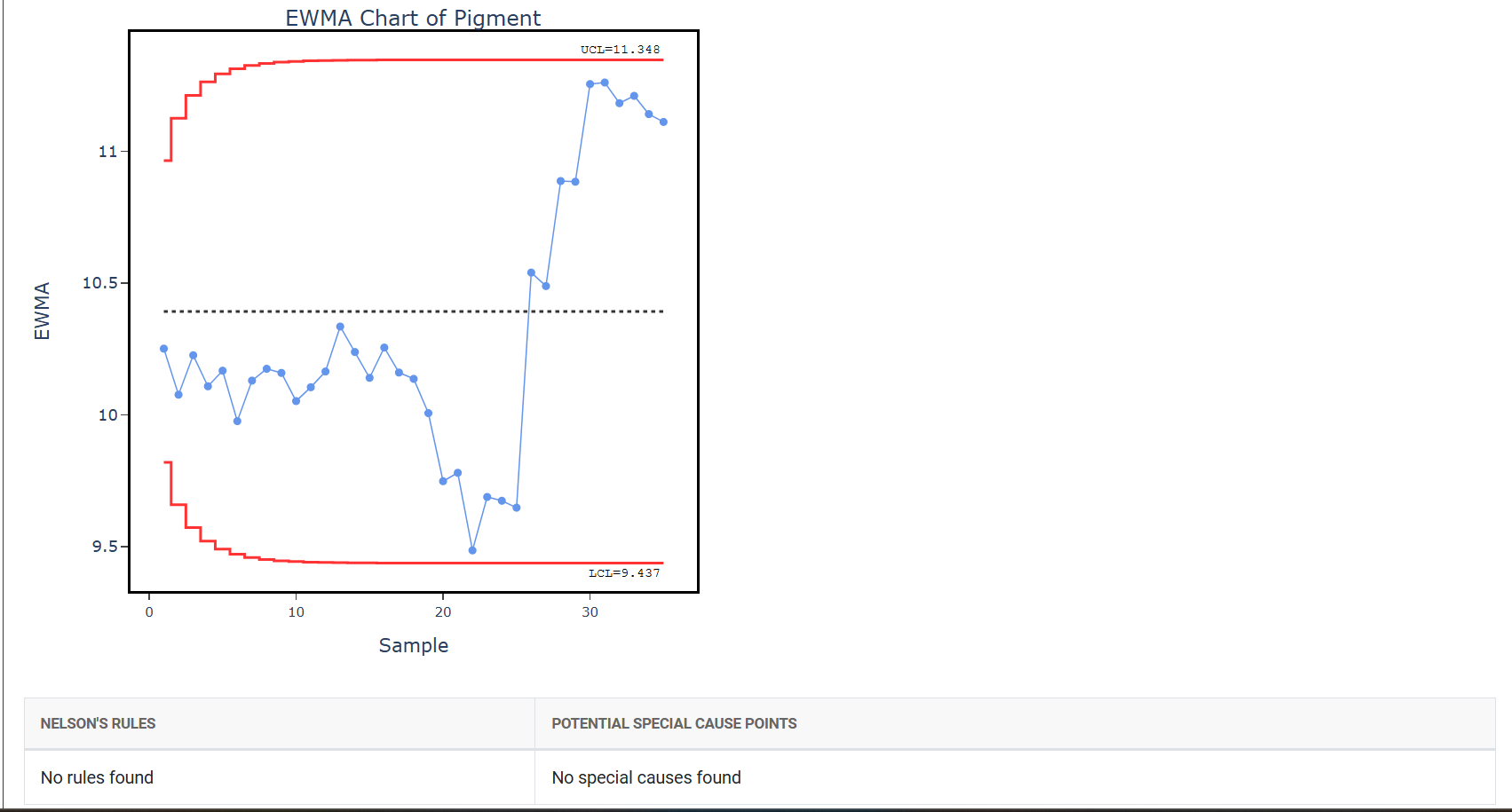
A quality engineer at a plastic manufacturing company wants to ensure that the batch production process remains consistent and under control. To monitor this, the engineer records the pigment concentration from each of the 35 production batches. The manager follows these steps:
- Gathered the necessary data.
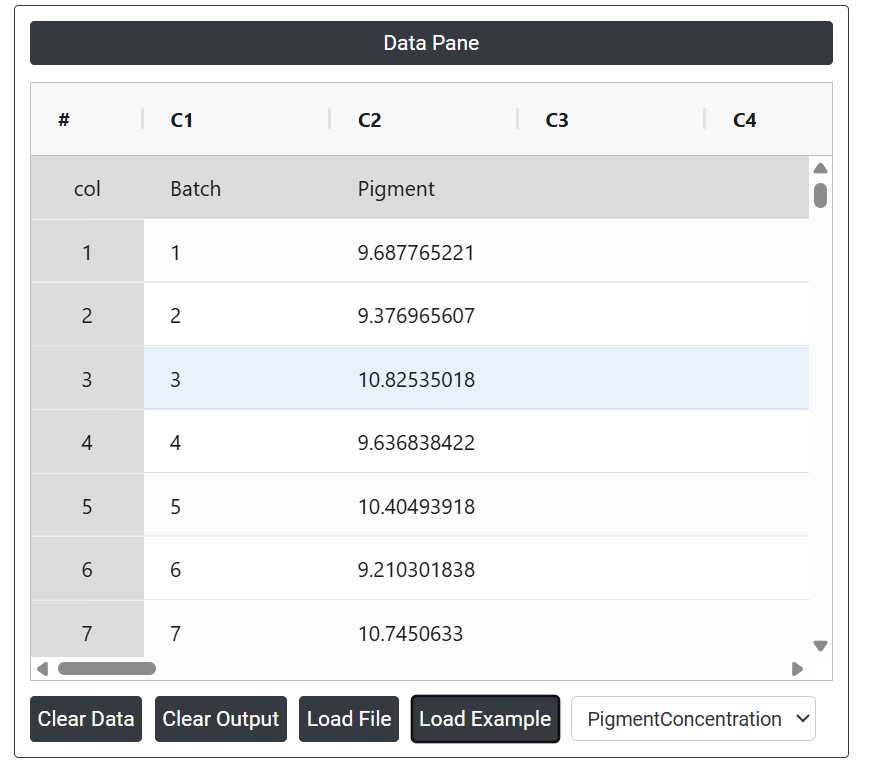
2. Now analyses the data with the help of https://qtools.zometric.com/ or https://intelliqs.zometric.com/.
3. To find EWMA Chart choose https://intelliqs.zometric.com/> Statistical module> Control Chart> EWMA Chart.
4. Inside the tool, feeds the data along with other inputs as follows:
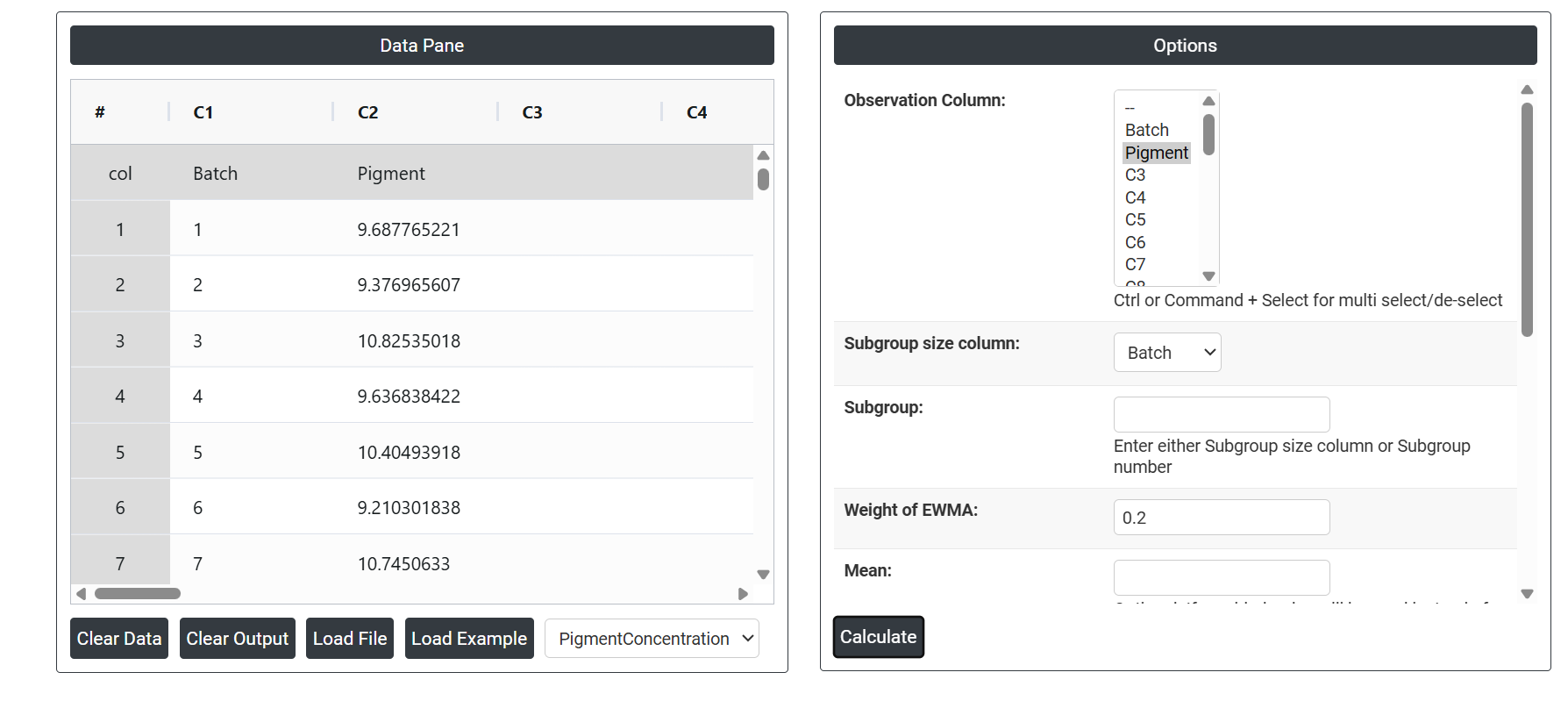
5. After using the above mentioned tool, fetches the output as follows:
How to generate EWMA Chart?
The guide is as follows:
- Login in to QTools account with the help of https://qtools.zometric.com/ or https://intelliqs.zometric.com/
- On the home page, choose Statistical Tool> Control Chart >EWMA Chart .
- Next, update the data manually or can completely copy (Ctrl+C) the data from excel sheet and paste (Ctrl+V) it here.
- Finally, click on calculate at the bottom of the page and you will get desired results.
On the dashboard of EWMA Chart, the window is separated into two parts.
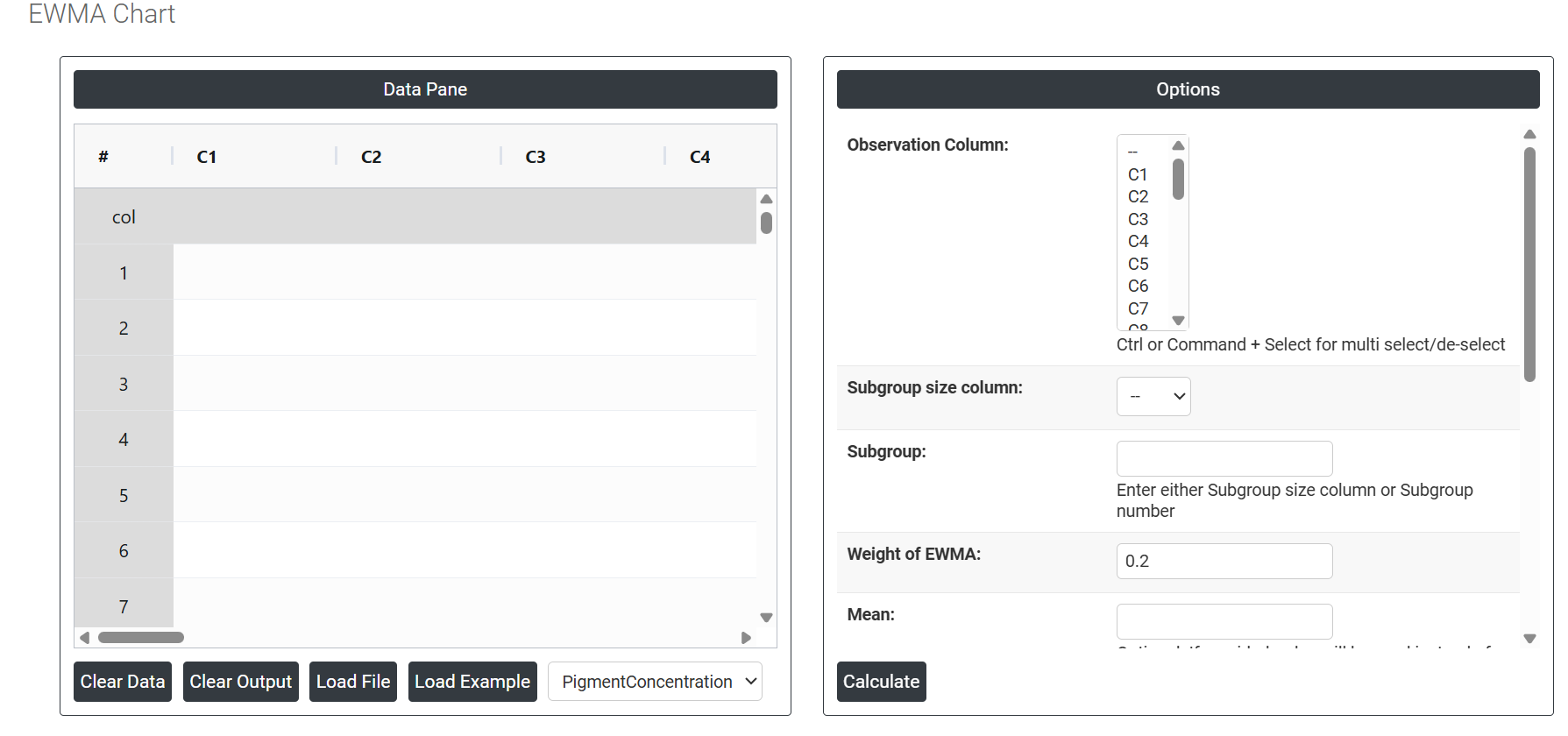
On the left part, Data Pane is present. Data can be fed manually or the one can completely copy (Ctrl+C) the data from excel sheet and paste (Ctrl+V) it here.
Load example: Sample data will be loaded.
Load File: It is used to directly load the excel data.
On the right part, there are many options present as follows:
Observation Column Select the column(s) containing your measurement data. Use Ctrl or Command + Click to select multiple columns. These are the individual or subgrouped values — such as dimensions, weights, or temperatures — that the chart will use to calculate the exponentially weighted moving averages and monitor for gradual process shifts over time.
- Subgroup Size Column Select the column that identifies which observations belong to which subgroup when subgroup sizes vary across time periods. Either this field or the Subgroup Number must be provided — not both. Use this when the number of measurements per subgroup is inconsistent throughout the dataset.
- Subgroup Enter a fixed number if all subgroups contain the same number of observations. When set to 1, the chart monitors individual measurements directly. When greater than 1, subgroup means are calculated first and the EWMA is then applied to those subgroup averages.
- Weight of EWMA (Lambda λ) The most important setting in the EWMA chart. Lambda controls how much weight is given to the most recent observation versus older ones when calculating each plotted value. It must be set between 0 and 1:
- Small lambda (0.05–0.10) — assigns more weight to historical data, producing heavy smoothing. Best for detecting very small, slow drifts but slower to react to sudden changes.
- Default lambda (0.20) — the recommended starting point for most processes, balancing sensitivity to small shifts with reasonable response speed.
- Large lambda (0.40–1.00) — assigns more weight to recent data, reacting faster to changes but smoothing less. At lambda = 1, the chart behaves identically to a standard I chart with no smoothing.
- Mean Optional. If you have a known or historically established target mean for the process, enter it here. When provided, the chart uses this value to position the centre line and calculate control limits directly, rather than estimating the mean from the current dataset — producing more stable limits that reflect a validated process baseline.
- Standard Deviation Optional. If you have a known or historically validated standard deviation, enter it here. When provided, this value is used directly to scale the EWMA control limits instead of estimating spread from the data — useful when a reliable process baseline already exists and you want consistent, stable limit calculations.
- SD Estimation Method for Subgroup Size = 1 Controls how standard deviation is estimated when data consists of individual measurements. Two options are available:
- Average Moving Range — estimates standard deviation by averaging the moving ranges between consecutive observations. This is the standard default and works reliably for most individual measurement processes.
- Median Moving Range — uses the median of moving ranges instead, making the estimate more robust against the influence of outliers or unusual data spikes.
- SD Estimation Method for Subgroup Size > 1 Controls how standard deviation is estimated when data is collected in subgroups of two or more. Three options are available:
- Pooled Stdev — combines standard deviations from all subgroups into one pooled estimate, providing a stable and accurate overall measure of within-subgroup variation.
- Rbar — estimates standard deviation from the average of subgroup ranges. Simple and reliable for subgroup sizes of 2 to 8.
- Sbar — estimates standard deviation from the average of subgroup standard deviations. More accurate than Rbar for subgroup sizes greater than 8.
- Check Rule 1 — 1 point > K standard deviations from centre line Enables the primary out-of-control detection rule. When activated, any single plotted EWMA value that falls beyond K standard deviations from the centre line is flagged as a signal. The default K is 3, corresponding to standard ±3 sigma control limits. Lower K values make the rule more sensitive and catch smaller deviations; higher K values reduce false alarms but require a larger shift before signalling.
- Length Moving Range Defines how many consecutive observations are used to calculate each moving range value when estimating standard deviation. The default is 2, meaning each moving range is the absolute difference between two consecutive measurements. Increasing this value produces a smoother standard deviation estimate but reduces sensitivity to short-term variation changes.
- Use Unbiasing Constant When checked, applies a statistical correction factor that removes the small mathematical bias naturally present when estimating standard deviation from sample data. This improves the accuracy of control limit calculations and is recommended to keep enabled for more precise and reliable results.