What is Attribute AQL Sampling Plans?
Attribute AQL Sampling Plans create standardised inspection procedures for attribute data — where each item is classified as conforming or non-conforming (pass or fail). The Acceptable Quality Level (AQL) defines the worst acceptable average quality from the producer's perspective. The plan specifies sample size and the maximum number of acceptable defectives before the lot is rejected, following recognised standards such as ISO 2859 or ANSI/ASQ Z1.4.
Simple Definitions: A standardised inspection plan that tells you how many items to check from a batch and how many defects are acceptable protecting both supplier and customer using internationally recognised AQL standards.
When to use Attribute AQL Sampling Plans?
- Use when inspecting large lots of discrete items and each item is assessed as pass or fail.
- Use when 100% inspection is impractical, too costly, or destructive.
- Use when a formal, auditable sampling procedure is required by a customer, standard, or regulatory body.
Guidelines for correct usage of Attribute AQL Sampling Plans
- Select AQL level appropriate to defect severity — tighter AQLs for critical/safety defects, relaxed for minor cosmetic issues.
- Use Inspection Level II as the standard default unless specific customer or regulatory requirements specify otherwise.
- Select samples randomly from throughout the entire lot — non-random sampling invalidates the plan's statistical basis.
- Document all results and lot disposition decisions for traceability and audit purposes.
Alternatives: When not to use Attribute AQL Sampling Plans
- If quality is measured on a continuous numerical scale, use Variable AQL Sampling Plans instead they require smaller sample sizes for equivalent protection.
- If lot sizes are very small, 100% inspection may be more practical and reliable.
- If the goal is ongoing process monitoring rather than lot acceptance, use SPC control charts
Example of Attribute AQL Sampling Plans
The following steps for Attribute AQL Sampling Plans:
- Fill the required options.
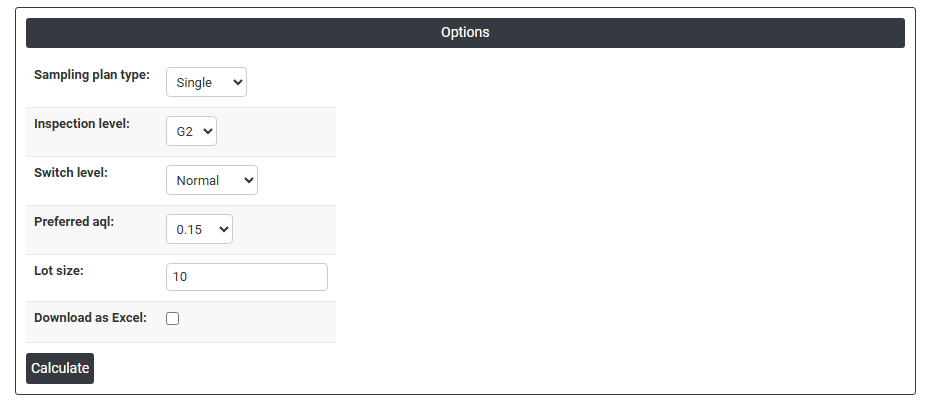
2. Now analyses the data with the help of https://qtools.zometric.com/ or https://intelliqs.zometric.com/.
3. To find Attribute AQL Sampling Plans choose https://intelliqs.zometric.com/> Statistical module> Sampling >Attribute AQL Sampling Plans.
4. After using the above mentioned tool, fetches the output as follows:

How to do Attribute AQL Sampling Plans
The guide is as follows:
- Login in to QTools account with the help of https://qtools.zometric.com/ or https://intelliqs.zometric.com/
- On the home page, choose Statistical Tool> Sampling>Attribute AQL Sampling Plans.
- Next, you need to fill the required options.
- Finally, click on calculate at the bottom of the page and you will get desired results.
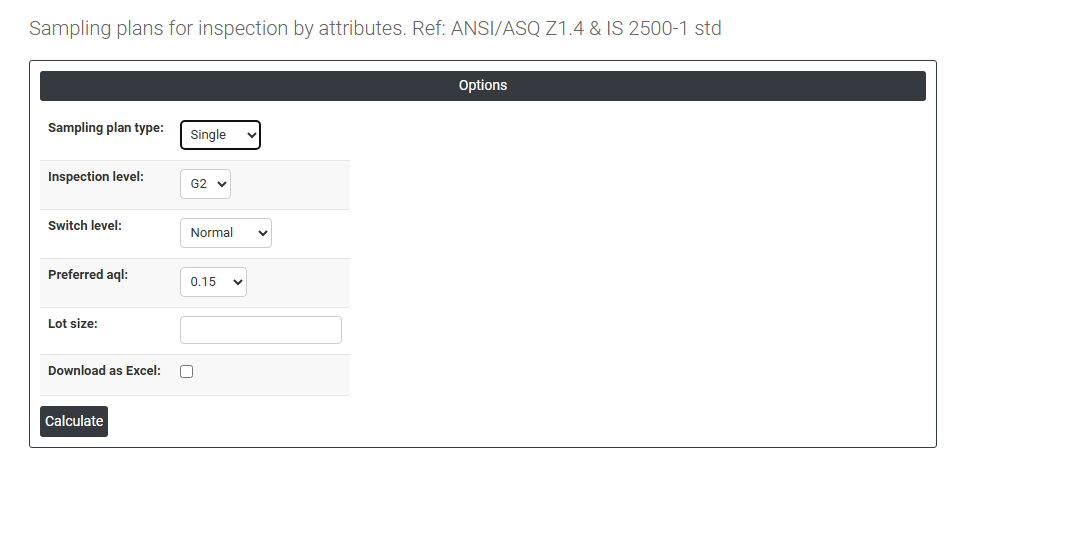
On the dashboard of Attribute AQL Sampling Plans, the window is separated into two parts.
Load example: Sample data will be loaded.
On the right part, there are many options present as follows:
- Sampling Plan Type Defines how many stages of sampling are used before making the accept/reject decision:
-
- Single — one sample is drawn and the lot is accepted or rejected based solely on that sample. Simplest to administer.
- Double — a first sample is drawn; if the result is borderline, a second sample is drawn before making the final decision. Reduces average sample size compared to single sampling.
- Multiple — up to seven successive small samples can be drawn, with an accept/reject/continue decision made after each. Most efficient in terms of average sample size but most complex to administer.
- Inspection Level Controls the discriminating power of the sampling plan — how well it separates acceptable from unacceptable lots. Standard levels G1, G2, G3 provide increasing sample sizes. Special levels S1–S3 provide smaller sample sizes for situations where inspection is costly or destructive. G2 is the standard default for most applications.
- Switch Level Controls which version of the sampling plan is currently active based on recent inspection history:
- Normal: the standard plan used under typical process conditions.
- Tightened: activated when recent lots have shown poor quality; uses stricter acceptance criteria to provide greater protection.
- Reduced: activated when the process has demonstrated consistently good quality; uses smaller sample sizes to reduce inspection cost.
- Preferred AQL: Select the Acceptable Quality Level from the standardised list. This defines the quality level considered acceptable from the producer's perspective. Smaller AQL values (e.g. 0.01, 0.04) provide tighter protection and are used for critical or safety-related characteristics. Larger values (e.g. 10, 25) are used for minor characteristics where higher defect rates are tolerable.
- Lot Size: Enter the total number of items in the batch being inspected. The lot size directly determines the required sample size from the AQL tables.
- Download as Excel: This will display the result in an Excel format.