What is Create Attribute Agreement Worksheet?
Create Attribute Agreement Worksheet is a setup tool that generates a structured, randomised data collection form for conducting an Attribute Agreement Analysis study also known as an Attribute Gage Study or Kappa study. It organises which appraiser should inspect which sample and in what randomised order, ensuring the study is conducted in a way that produces valid, unbiased results.
Unlike a standard Gage R&R which deals with measurable, continuous data, the Attribute Agreement Worksheet is specifically designed for situations where the inspection result is a category such as pass/fail, good/defective, acceptable/reject, or any other classification-based outcome.
Simple Definitions:A tool that creates a ready-to-use, randomised inspection plan for an attribute agreement study organising which appraiser inspects which sample in what order, so agreement and consistency can be properly measured.
When to use Create Attribute Agreement Worksheet?
- Use when your inspection or measurement outcome is categorical rather than numeric — such as pass/fail, go/no-go, conforming/nonconforming.
- Use when validating visual inspection processes — such as surface defect detection, label inspection, or cosmetic appearance grading.
- Use when assessing whether multiple appraisers agree with each other and with a known standard when classifying items.
- Use as part of a measurement system validation before launching a product, process, or inspection method into full production.
Guidelines for correct usage of Create Attribute Agreement Worksheet
- Select a sample of parts that includes a mix of clearly good, clearly bad, and borderline items borderline cases are the most informative for assessing appraiser consistency.
- Use at least 3 appraisers and 20 to 30 samples with each appraiser rating each sample at least twice to detect within-appraiser inconsistency.
- Ensure appraisers rate samples independently they must not see each other's ratings or know the known standard result during the study.
- Follow the randomised order generated by the worksheet re-presenting samples in random order prevents appraisers from remembering their previous answers.
- After data collection, analyse using Attribute Agreement Analysis to calculate Kappa statistics and assess within-appraiser and between-appraiser agreement.
Alternatives: When not to use Create Attribute Agreement Worksheet
- If the measurement outcome is continuous and numeric, use Create Gage R&R Study Worksheet
- If parts are destroyed during inspection, use Nested GRR or a suitable destructive attribute study design instead.
- If the goal is to assess measurement accuracy and precision rather than classification agreement, use standard Gage R&R methods
Example of Create Attribute Agreement Worksheet
This is following steps to Generate the Create Gage R and R study worksheet:
- To Generate the Attribute Agreement Analysis Worksheet .
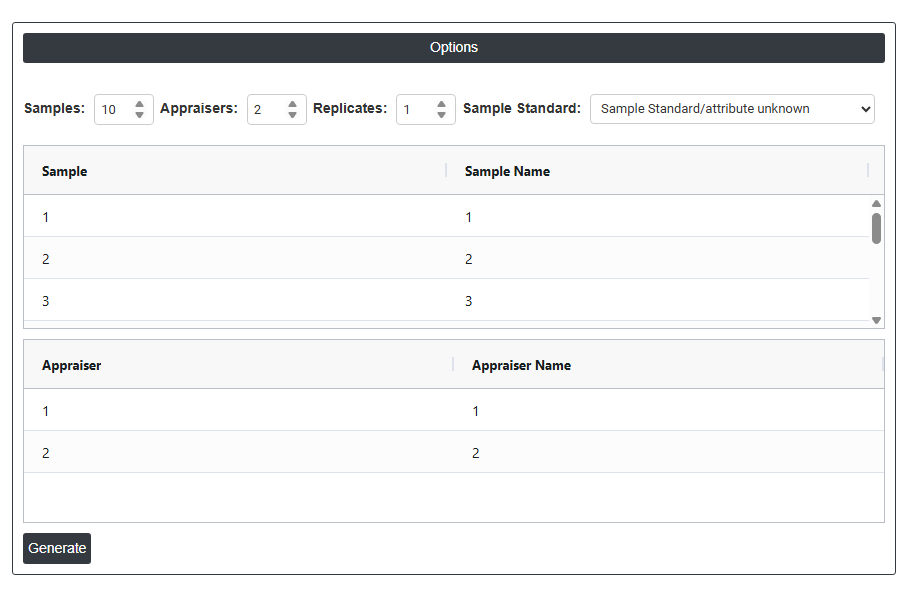
- Now analyses the data with the help of https://qtools.zometric.com/ or https://intelliqs.zometric.com/.
- To find Create Attribute Agreement Worksheet choose https://intelliqs.zometric.com/> Statistical module> Measurement System Analysis>Create Attribute Agreement Worksheet.
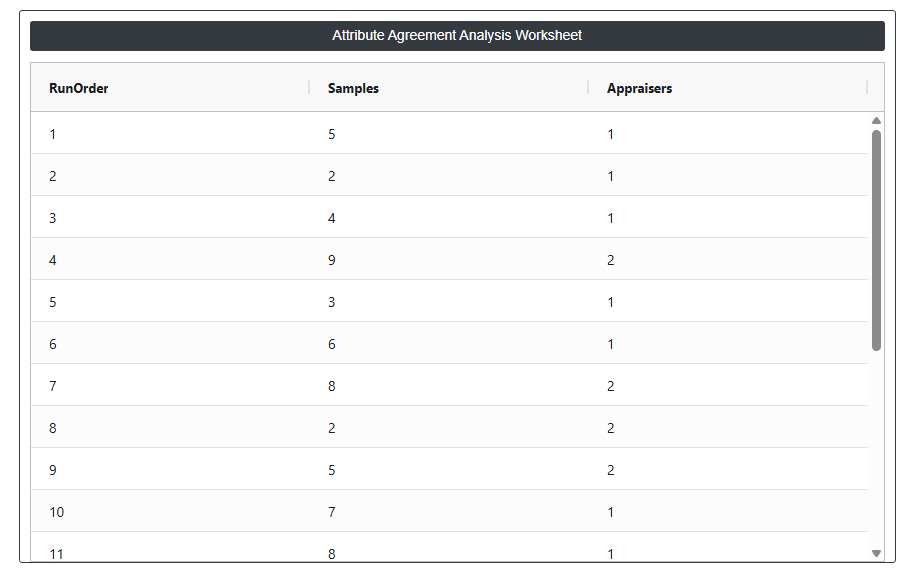
- After using the above mentioned tool, fetches the output as follows:

How to do Create Attribute Agreement Worksheet
The guide is as follows:
- Login in to your Zometric Q-Tools account at: https://qtools.zometric.com/ or https://intelliqs.zometric.com/
- On the home page, choose Statistical Tool> Measurement System Analysis >Create Attribute Agreement Worksheet.
- Fill the required options.
- Finally, click on calculate at the bottom of the page and you will get desired results.
On the dashboard of Create Attribute Agreement Worksheet, the window is separated into two parts.
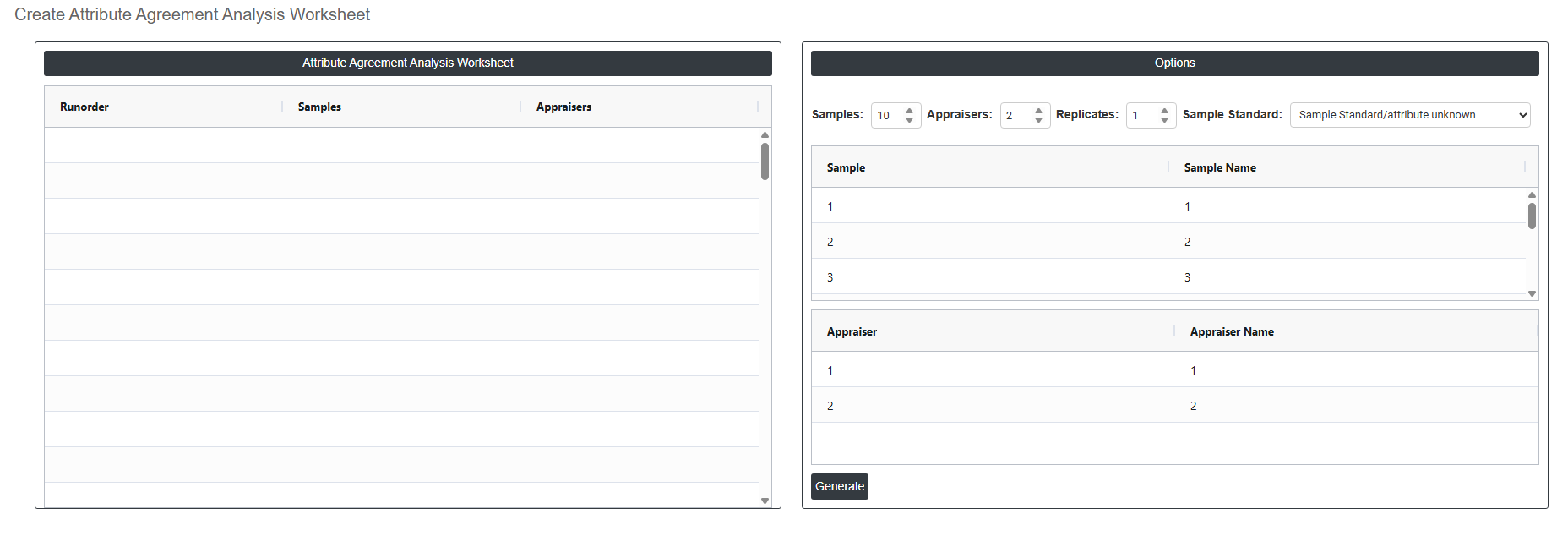
On the left part, Attribute Agreement Analysis Worksheet is present. In the Attribute Agreement Analysis Worksheet, by Clicking this Generate button creates the completed attribute agreement study worksheet based on all settings entered above. The generated worksheet lists every inspection assignment in a fully randomised order specifying which appraiser should inspect which sample for each replicate. This randomised sequence must be followed exactly during data collection to prevent appraisers from remembering previous decisions and to ensure the study results are unbiased and statistically valid.
On the right part, there are many options present as follows:
- Samples: Sets the total number of samples or parts to be included in the study. The default is 10, which is the commonly used minimum. Samples should be carefully selected to include a mix of clearly acceptable parts, clearly unacceptable parts, and borderline parts that sit close to the specification boundary borderline samples are the most revealing for assessing appraiser consistency and are essential for a meaningful study.
- Appraisers: Sets the number of appraisers who will participate in the study. The default is 2; however, 3 appraisers is the recommended standard as it gives a more complete picture of between-appraiser agreement. Each appraiser will independently inspect every sample the number of times defined by the Replicates setting. Appraisers should be selected from those who routinely perform this inspection in normal production.
- Replicates: Sets how many times each appraiser will inspect each sample. The default is 1; however, a minimum of 2 replicates is strongly recommended without repeat inspections, within-appraiser consistency (repeatability) cannot be assessed at all. Using 3 replicates is the preferred standard as it provides a more reliable measure of whether each appraiser makes the same decision on the same part when presented with it again in a different randomised order.
- Sample Standard: Defines whether a known reference standard or correct answer exists for each sample. This dropdown controls how the analysis handles accuracy assessment. Two options are available:
- Sample Standard/Attribute Unknown — no reference standard has been established. The analysis can only assess agreement between appraisers it cannot measure whether their decisions are actually correct. Use this when no expert reference exists yet.
- Sample Standard/Attribute Known — a verified correct classification exists for each sample. The analysis will measure both appraiser-to-appraiser agreement and each appraiser's accuracy against the known standard. This is the preferred option as it gives a complete and more meaningful assessment of the inspection system.
- Sample / Sample Name Table: Displays a row for each sample in the study. The Sample column shows the automatically assigned sample number. The Sample Name column is fully editable replace the default numbers with meaningful identifiers such as serial numbers, part codes, or descriptive labels. Using clear sample names makes the completed worksheet easier to follow during data collection and makes the analysis output easier to trace back to specific physical samples.
- Appraiser / Appraiser Name Table: Displays a row for each appraiser in the study. The Appraiser column shows the automatically assigned appraiser number. The Appraiser Name column is fully editable replace the default numbers with the actual names or employee IDs of the appraisers participating in the study. Using real names ensures the worksheet is unambiguous and that the analysis output clearly identifies which individual produced which results.