What is Nominal Logistic Regression?
Nominal Logistic Regression is a statistical tool used to analyze the relationship between one or more predictor variables and a categorical response variable with three or more unordered categories — such as scratch, dent, or tear. It predicts the probability of each category occurring based on the predictor values.
When to use Nominal Logistic Regression?
Predictor Variables
- Predictors can be continuous, categorical, or a mix of both
- Discrete variables can be treated as continuous or categorical depending on the number of levels and the goal of the analysis
- Only one continuous predictor with a continuous response → use Fit Line Model
- Multiple predictors with a continuous response → use Fit Regression Model
Response Variable
- The response must have three or more categories with no natural order (e.g. color, material type, defect type)
- If the response is continuous → use Fit Regression Model
- If the response has two categories (pass/fail) → use Fit Binary Logistic Model
- If the response has ordered categories (low/medium/high) → use Ordinal Logistic Regression
Guidelines for correct usage of Nominal Logistic Regression
- The response variable must have three or more unordered categories; if the categories have a natural order, use Ordinal Logistic Regression instead.
- Predictors can be continuous or categorical; ensure each variable is correctly classified before running the analysis.
- Ensure the data accurately represents the target population; biased or incomplete data will produce unreliable predictions.
- Collect sufficient data points per category — too few observations in any category makes the model unstable and predictions untrustworthy.
- Measure all variables as accurately as possible; errors in input data directly reduce the accuracy of the predicted probabilities.
- Record data in the order it is collected to help identify any time-based patterns that could affect results.
- After fitting, validate the model using goodness-of-fit statistics and residual diagnostics; a poorly fitting model produces misleading category predictions.
- Check that no category has too few observations — rare categories reduce model reliability and may cause estimation issues.
Alternatives: When not to use Nominal Logistic Regression
- If the response variable is continuous, use Fit Regression Model instead.
- If you have only one continuous predictor with a continuous response, use Fit Line Model instead.
- If the response has two categories (e.g. pass/fail), use Fit Binary Logistic Model instead.
- If the response categories have a natural order (e.g. low/medium/high), use Ordinal Logistic Regression instead.
- If you have one categorical predictor with a continuous response, use One-Way ANOVA instead.
Example of Nominal Logistic Regression?
To evaluate the effectiveness of different teaching methods, a school administrator gathers data from 30 students, recording each student's favorite subject along with the teaching method used in their classroom. Since the response variable—subject preference (math, science, or language arts)—is categorical with no inherent order, the administrator applies nominal logistic regression. This analysis helps explore how students’ ages (ranging from 10 to 13) and the type of teaching method (demonstration or explanation) are associated with their subject preferences. The following steps:
- Gathered the necessary data.
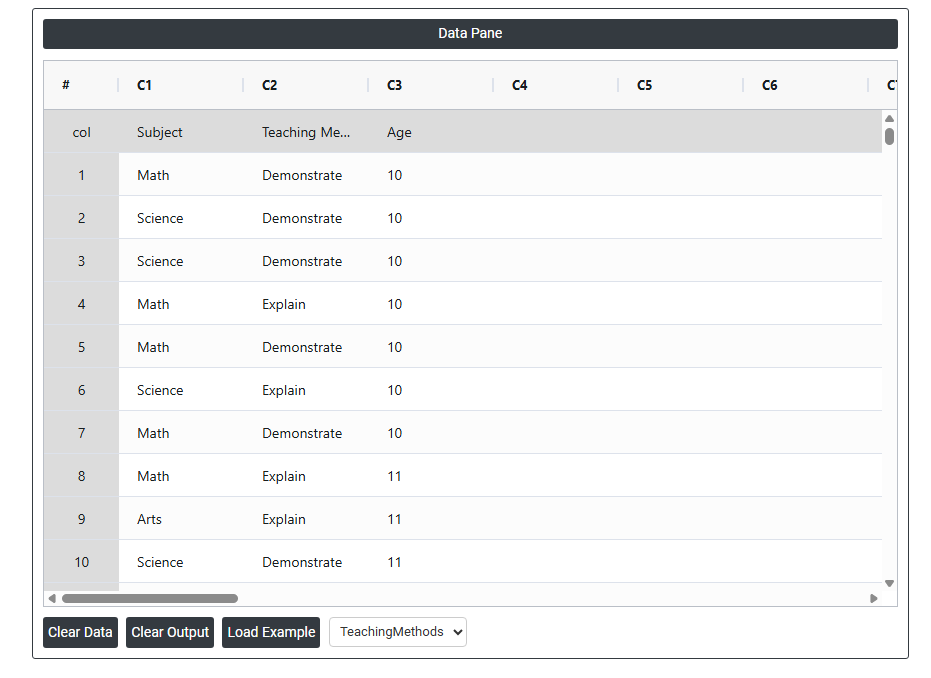
- Now analyses the data with the help of https://qtools.zometric.com/ or https://intelliqs.zometric.com/.
- To find Nominal Logistic Regression choose https://intelliqs.zometric.com/> Statistical module> Regression>Nominal Logistic Regression.
- Inside the tool, feed the data along with other inputs as follows:
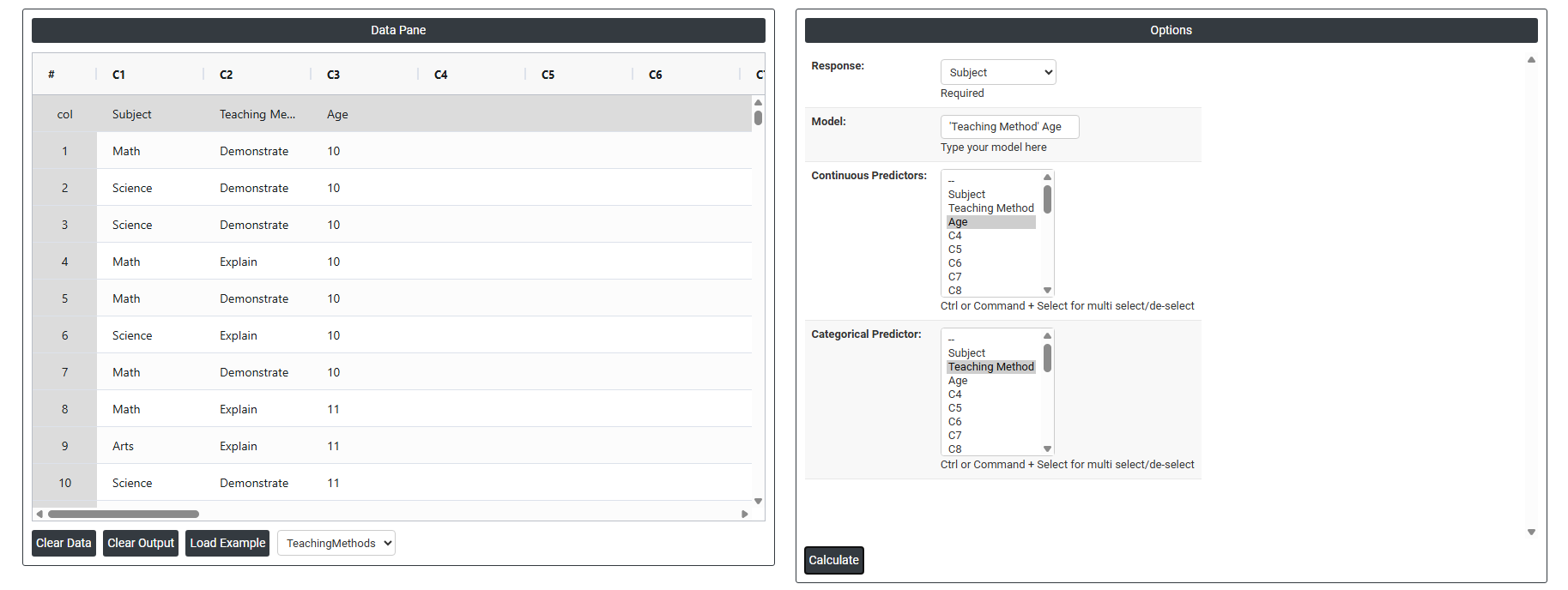
5. After using the above mentioned tool, fetches the output as follows
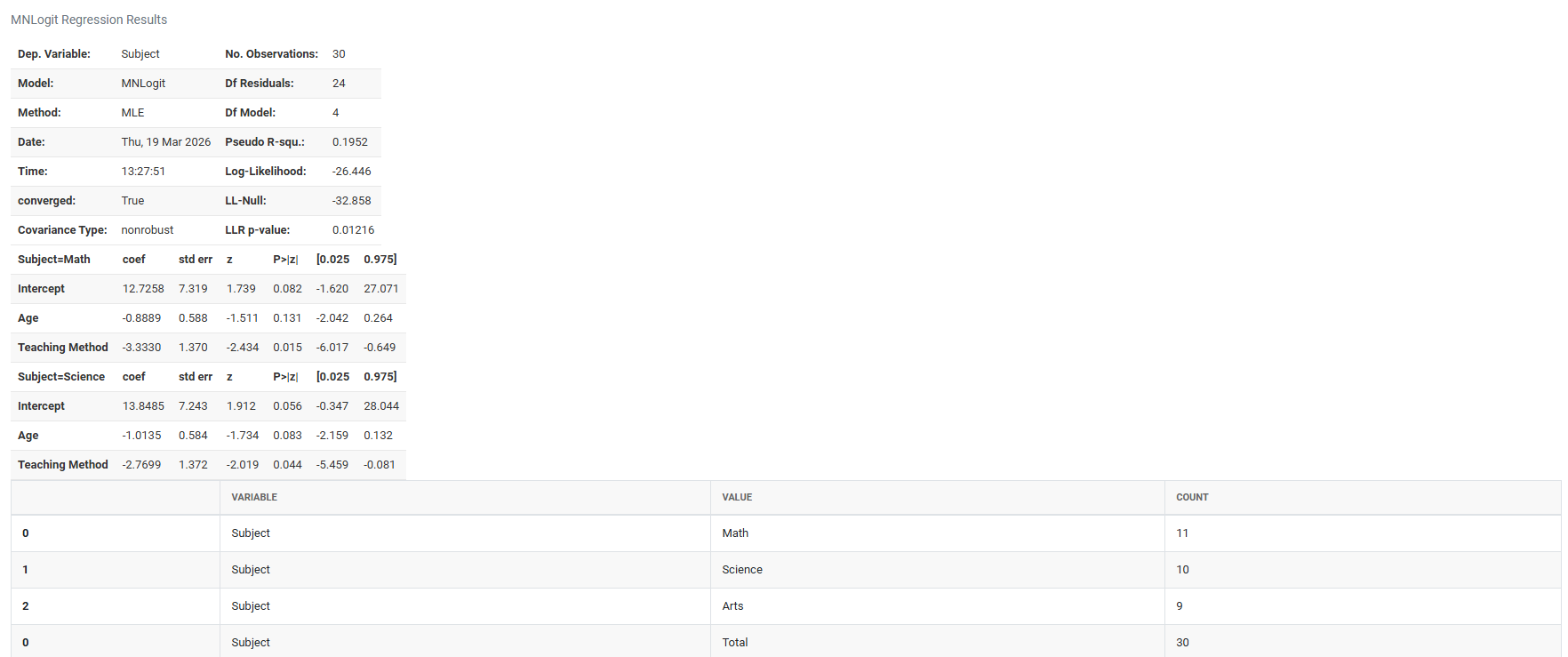

How to do Nominal Logistic Regression
The guide is as follows:
- Login in to QTools account with the help of https://qtools.zometric.com/ or https://intelliqs.zometric.com/
- On the home page, choose Statistical Tool> Regression > Nominal Logistic Regression.
- Next, update the data manually or can completely copy (Ctrl+C) the data from excel sheet or paste (Ctrl+V) it or else there is say option Load Example where the example data will be loaded.
- Next, you need to fill the required options .
- Finally, click on calculate at the bottom of the page and you will get desired results.
On the dashboard of Nominal Logistic Regression, the window is separated into two parts.
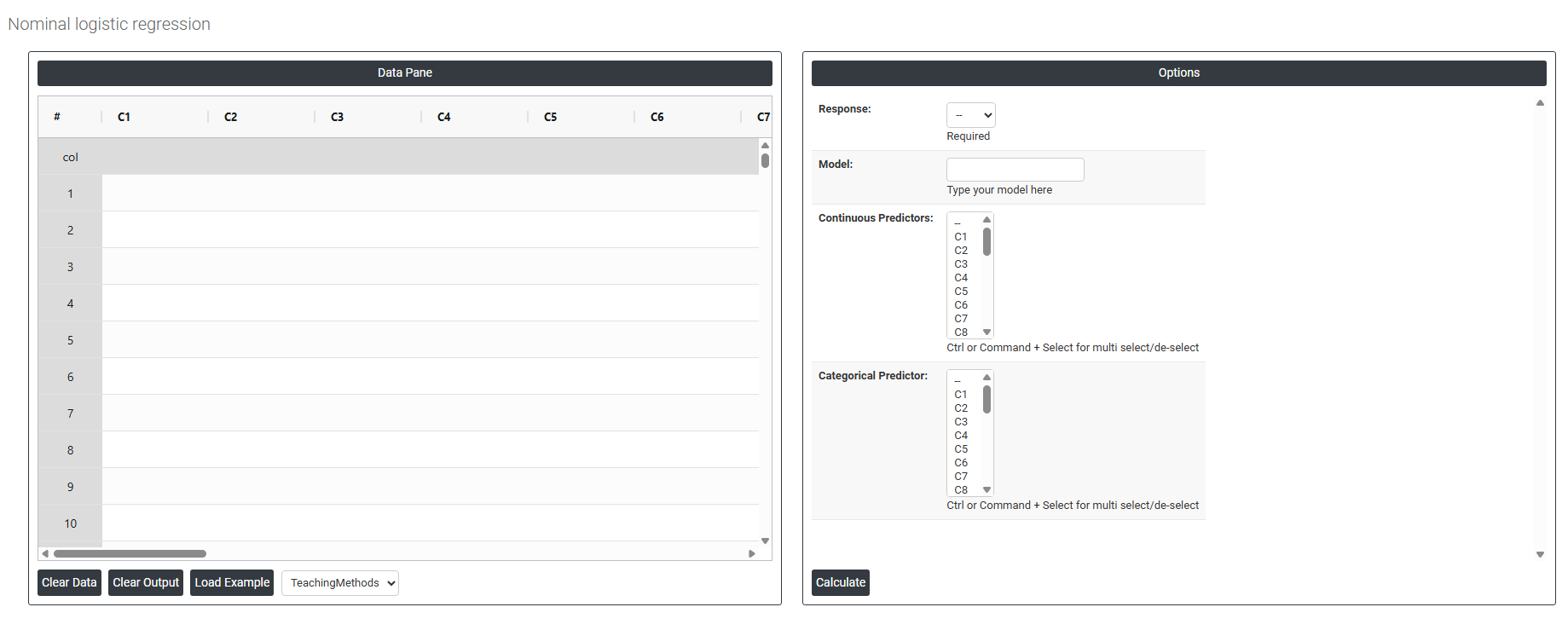
On the left part, Data Pane is present. In the Data Pane, each row makes one subgroup. Data can be fed manually or the one can completely copy (Ctrl+C) the data from excel sheet and paste (Ctrl+V) it here.
Load example: Sample data will be loaded.
Load File: It is used to directly load the excel data.
On the right part, there are many options present as follows:
-
Response: The outcome variable you are trying to predict or classify — it must contain three or more categories with no natural order, such as defect type (scratch, dent, tear) or payment method (cash, card, online). The model estimates the probability of each category occurring based on the predictor values provided.
-
Categorical Predictor: A predictor variable that contains a fixed set of distinct groups or labels, such as machine type, shift, or material. These groups have no measurable distance between them. Each category is treated as a separate level and the model estimates how each group influences the probability of each response category.
-
Continuous Predictor: A predictor variable that can take any measurable numeric value within a range, such as temperature, pressure, or time. The model uses these values to estimate how a unit increase in the predictor shifts the probability of the response falling into each category.
-
Model: Defines which predictors and interaction terms are included in the analysis. By default, the analysis builds a main effects model using all selected predictors. You can customize it to include interaction terms (e.g. A*B) if you believe two predictors jointly influence the response. Choosing the right model structure is important — including unnecessary terms adds noise, while missing key terms leads to inaccurate predictions.