What is Non-Normal Process Capability?
Non-Normal Process Capability analysis measures how well a process meets its specification limits when the underlying data does not follow a normal (bell-curve) distribution. Rather than forcing a normality assumption onto skewed or unusual data, this analysis fits a recognised non-normal distribution — such as Weibull, Lognormal, Exponential, or Gamma — to the data and then calculates capability indices based on that distribution's actual shape.
Standard capability indices like Cp and Cpk assume normality. When that assumption is violated, those indices become inaccurate and can either overestimate or underestimate true process capability. Non-Normal Capability solves this by using the correct distributional model, giving a far more honest and precise picture of whether the process can consistently deliver product within specification.
Simple Definitions: A capability analysis designed for data that is skewed or non-normal — it fits the right distribution to your data and then calculates capability indices based on that actual shape, rather than forcing an incorrect normal assumption.
When to use Non-Normal Process Capability?
- Use when your process data is continuous but does not pass a normality test — for example, cycle times, strength measurements, or chemical concentrations that are heavily skewed.
- Use when a probability plot or normality test confirms that your data follows a specific non-normal distribution such as Weibull, Lognormal, Exponential, or Gamma.
- Use when applying Box-Cox or Johnson transformation is not appropriate or practical — for example, when the transformed data is difficult to interpret in the original units.
- Use when the Individual Distribution Identification tool has confirmed the best-fitting distribution for your data.
Guidelines for correct usage of Non-Normal Process Capability
- Always run Individual Distribution Identification first to determine the best-fitting distribution before selecting it in this analysis — choosing the wrong distribution will produce misleading capability indices.
- Collect at least 100 data points to ensure the distribution fitting process produces reliable and stable parameter estimates.
- Ensure the process is stable and in statistical control before running capability analysis — an unstable process will produce meaningless capability figures regardless of which distribution is used.
- Do not use this analysis for attribute or count data — use Binomial or Poisson Capability instead.
- Verify the chosen distribution using goodness-of-fit statistics and probability plots — a high p-value and straight probability plot line confirms a good fit.
- Capability indices such as Pp, Ppk, Cp, and Cpk are reported based on the fitted distribution's percentiles rather than standard deviation multiples — interpret them accordingly.
Alternatives: When not to use Non-Normal Process Capability
-
Situation Use Instead Data is normally distributed Normal (standard) Capability Analysis Data can be transformed to normality Capability Analysis with Box-Cox or Johnson Transformation Distribution is unknown or unclear Nonparametric Process Capability Data is pass/fail or defective counts Binomial Capability Analysis Data is counts of events (defects per unit) Poisson Capability Analysis Need combined graphical & statistical report Capability Six Pack (Between/Within)
Example of Non-Normal Process Capability?
An automotive component manufacturer is developing a critical component for an OEM customer. To ensure quality, an engineer is checking if a drilling machine can meet specifications. The part needs to be within a range: LSL (Lower Specification Limit) of 22.15 and USL (Upper Specification Limit) of 22.35. The engineer takes 125 samples from the machine and conducts a machine capability study. The following steps:
- Gathered the necessary data.
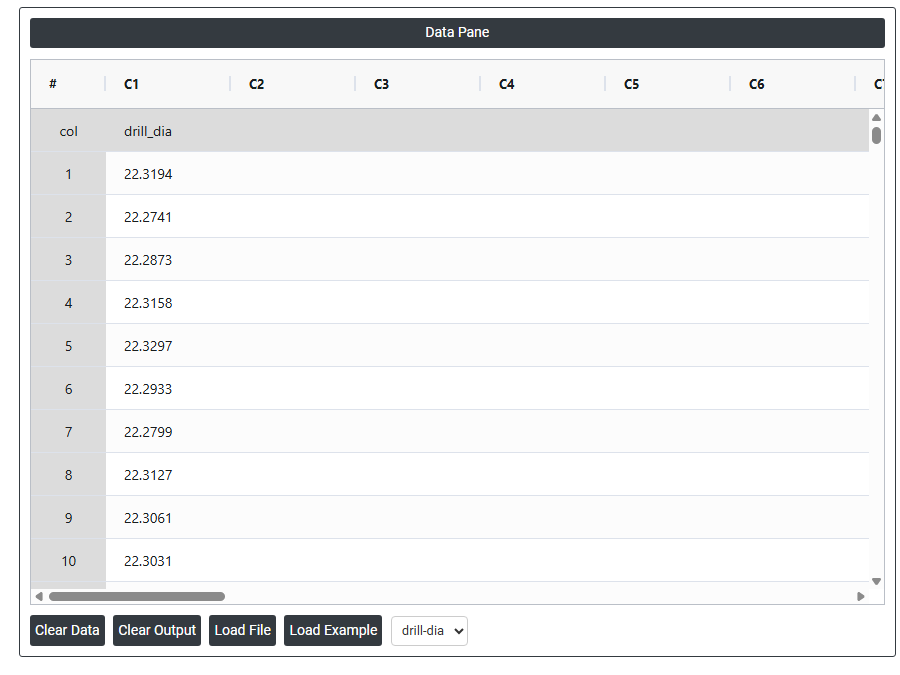
- Now analyses the data with the help of https://qtools.zometric.com/ or https://intelliqs.zometric.com/.
- To find Non-Normal Process Capability choose https://intelliqs.zometric.com/> Statistical module> Control Chart>Non-Normal Process Capability.
- Inside the tool, feeds the data along with other inputs as follows:
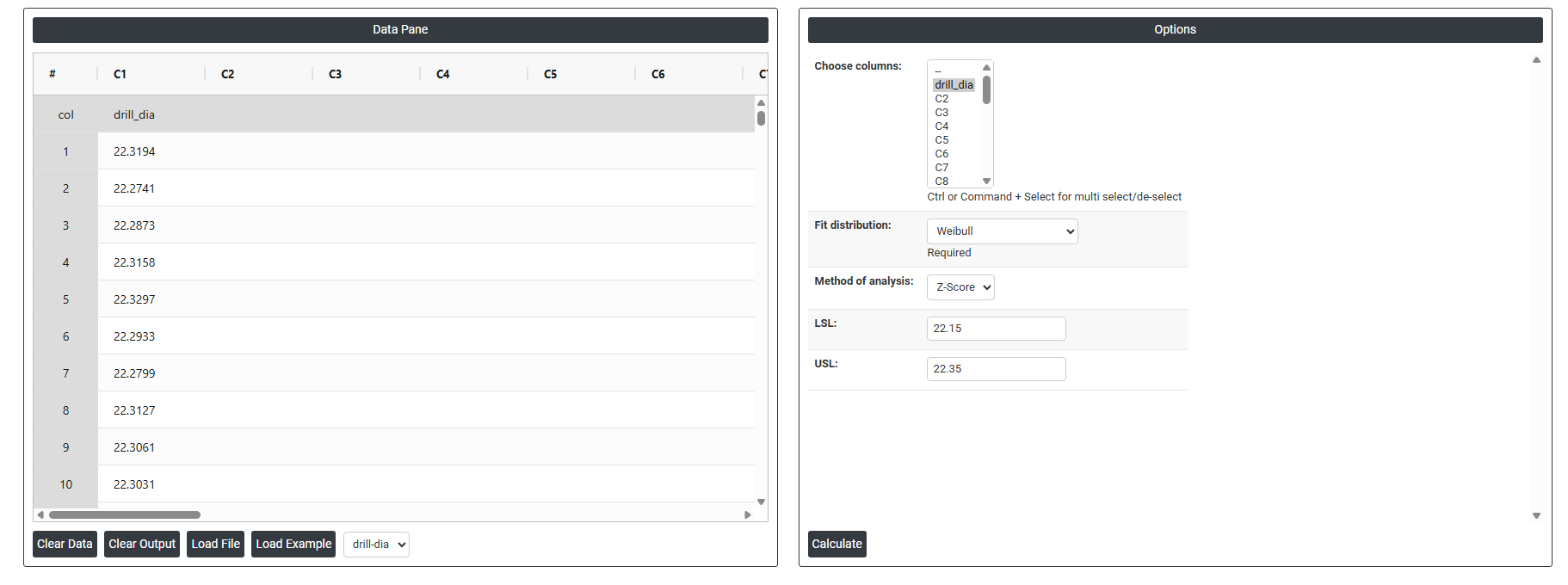
5. After using the above mentioned tool, fetches the output as follows:
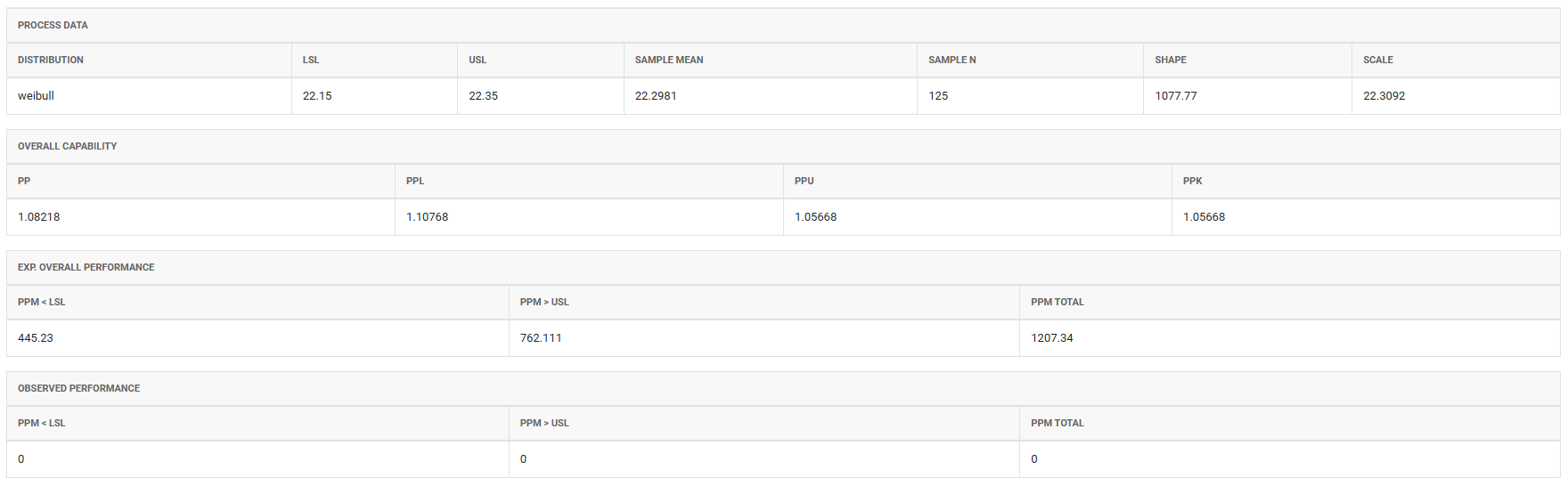
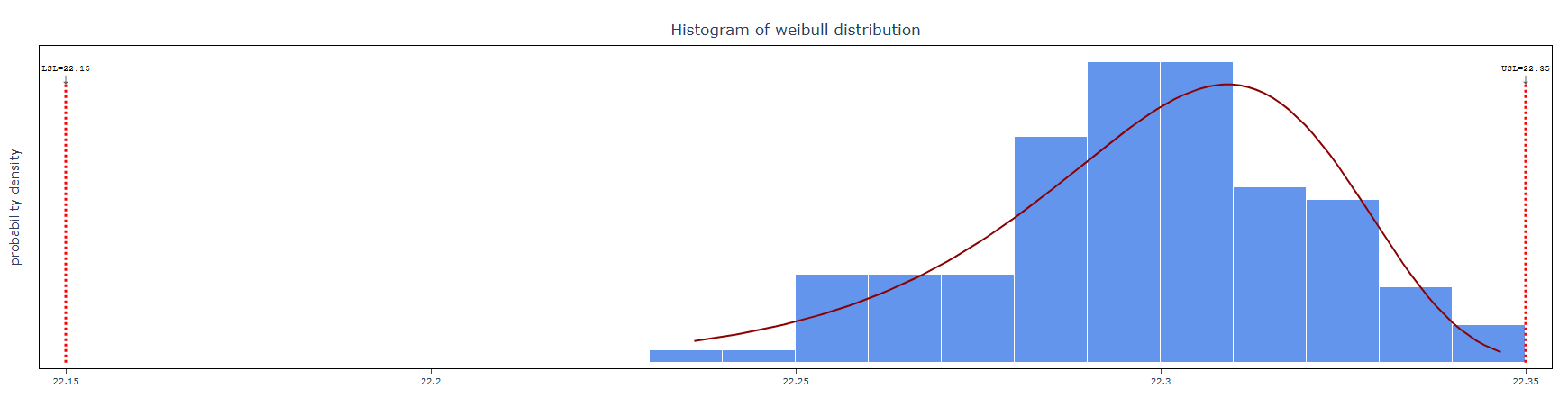
How to do Non-Normal Process Capability .
The guide is as follows:
- Login in to QTools account with the help of https://qtools.zometric.com/ or https://intelliqs.zometric.com/
- On the home page, choose Statistical Tool> Control Chart>Non-Normal Process Capability .
- Next, update the data manually or can completely copy (Ctrl+C) the data from excel sheet and paste (Ctrl+V) it here.
- Fill the required options .
- Finally, click on calculate at the bottom of the page and you will get desired results.
On the dashboard of Non-Normal Process Capability, the window is separated into two parts.
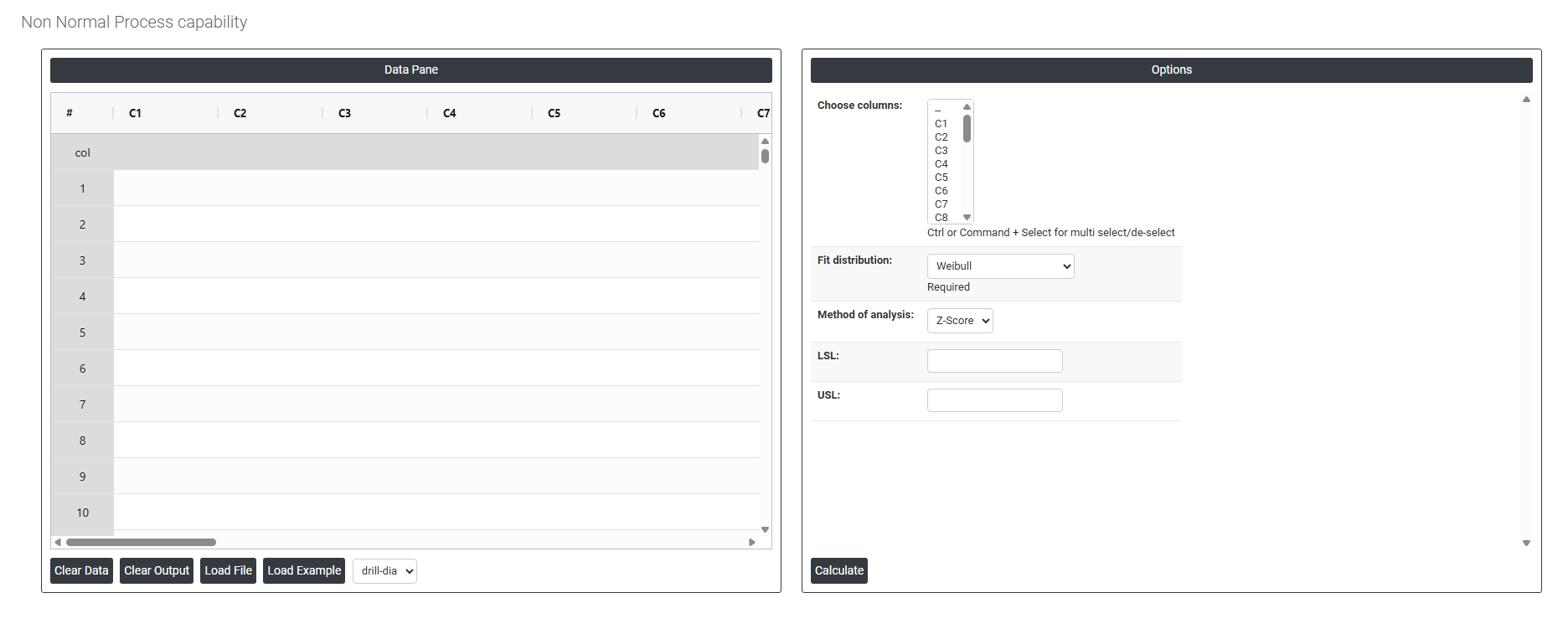
On the left part, Data Pane is present. In the Data Pane, each row makes one subgroup. Data can be fed manually or the one can completely copy (Ctrl+C) the data from excel sheet and paste (Ctrl+V) it here.
Load example: Sample data will be loaded.
Load File: It is used to directly load the excel data.
On the right part, there are many options present as follows:
- Choose Columns Select the column(s) containing your continuous measurement data. Use Ctrl or Command + Click to select multiple columns at once. These are the actual process measurements — such as drill diameters, tensile strengths, or cycle times — that will be analysed for capability against the specification limits using the selected non-normal distribution.
- Fit Distribution Select the distribution that best describes the shape of your data. This is the most critical setting in the analysis — the capability indices are calculated based on the mathematical properties of the chosen distribution, so selecting the wrong one will produce inaccurate results. Always run Individual Distribution Identification first to confirm which distribution fits your data before making this selection. Available options and their typical use cases:
- Weibull — commonly used for reliability, fatigue life, and failure time data. Handles right-skewed data well and is one of the most flexible and widely applied non-normal distributions.
- Exponential — used for data representing time between independent random events, such as time between machine failures or service call arrivals. Assumes a constant failure rate.
- Logistic — similar in shape to the normal distribution but with heavier tails. Used when data is symmetric but has more extreme values than normality would predict.
- Loglogistic — a right-skewed distribution used for survival and reliability data, similar to Lognormal but with heavier tails. Suitable for failure time or income-type data.
- Largest Extreme Value — models the distribution of the maximum value in a sample. Used when data represents peak measurements such as maximum stress, flood levels, or highest temperatures.
- Smallest Extreme Value — models the distribution of the minimum value in a sample. Commonly used for minimum strength or smallest observed measurements.
- 2-Parameter Exponential — an extension of the standard Exponential distribution that includes a threshold parameter, allowing the distribution to start at a value other than zero. Useful when measurements cannot be below a certain minimum value.
- 3-Parameter Weibull — adds a location (threshold) parameter to the standard Weibull, allowing the distribution to start at a non-zero point. Useful when no failures or measurements can occur below a known minimum value.
- Gamma — a flexible right-skewed distribution commonly applied to process times, waiting times, rainfall amounts, and other positive continuous measurements that are moderately skewed.
- Lognormal — used when the logarithm of the data is normally distributed. Common in chemical concentrations, particle sizes, repair times, and financial data where values are strictly positive and right-skewed.
- Method of Analysis Determines how the capability statistics and specification limits are interpreted and reported. Two options are available:
- Z-Score — calculates capability by converting specification limits into standardised Z-scores based on the fitted distribution's percentiles. This expresses capability in terms of how many standard deviations the specification limits are from the process centre, making results comparable to standard normal capability indices like Cp and Cpk.
- ISO — follows the ISO 22514 standard methodology for non-normal capability analysis. This method calculates capability indices directly from the distribution percentiles (specifically the 0.135th and 99.865th percentiles, which correspond to ±3 sigma boundaries in a normal distribution), without converting to Z-scores. This is the preferred method when compliance with international quality standards is required.
- LSL (Lower Specification Limit) The minimum acceptable value for the measurement. Any data point falling below this value is considered out of specification. Enter the LSL defined by your engineering drawing, customer requirement, or product specification. At least one specification limit (LSL or USL) must be provided — both can be entered if the measurement has two-sided specifications.
- USL (Upper Specification Limit) The maximum acceptable value for the measurement. Any data point exceeding this value is considered out of specification. Enter the USL from your engineering drawing or product specification. If the process characteristic only has a one-sided requirement — for example, a minimum strength with no upper limit — only the relevant limit needs to be entered.