What is Variable AQL sampling plans?
Variable AQL Sampling Plans create inspection procedures for continuous measurement data where quality is assessed by measuring actual values such as dimensions, weights, or electrical properties. By using measurement values rather than simple pass/fail classification, variable sampling achieves equivalent protection with significantly smaller sample sizes.
Simple Definitions: A more efficient inspection plan for measurable characteristics using actual measurement values to make accept/reject decisions with smaller sample sizes than equivalent attribute plans.
When to use Variable AQL sampling plans ?
- Use when quality is assessed by measuring a continuous characteristic such as length, weight, hardness, voltage, or concentration.
- Use when you want to reduce sample sizes while maintaining equivalent quality protection to attribute plans.
- Use when measurement data is approximately normally distributed.
Guidelines for correct usage of Variable AQL sampling plans
- Verify approximate normality of measurement data before applying variable plans — non-normality invalidates the plan.
- Use calibrated and validated measurement equipment — variable plans depend entirely on measurement accuracy.
- Select the appropriate AQL and inspection level based on the criticality of the characteristic.
Alternatives: When not to use Variable AQL sampling plans
- If quality can only be assessed as pass or fail, use Attribute AQL Sampling Plans
- If data is severely non-normal and cannot be corrected, attribute sampling is safer and more reliable.
Example of Variable AQL sampling plans
The following steps for Variable AQL sampling plans:
- Fill the required options.
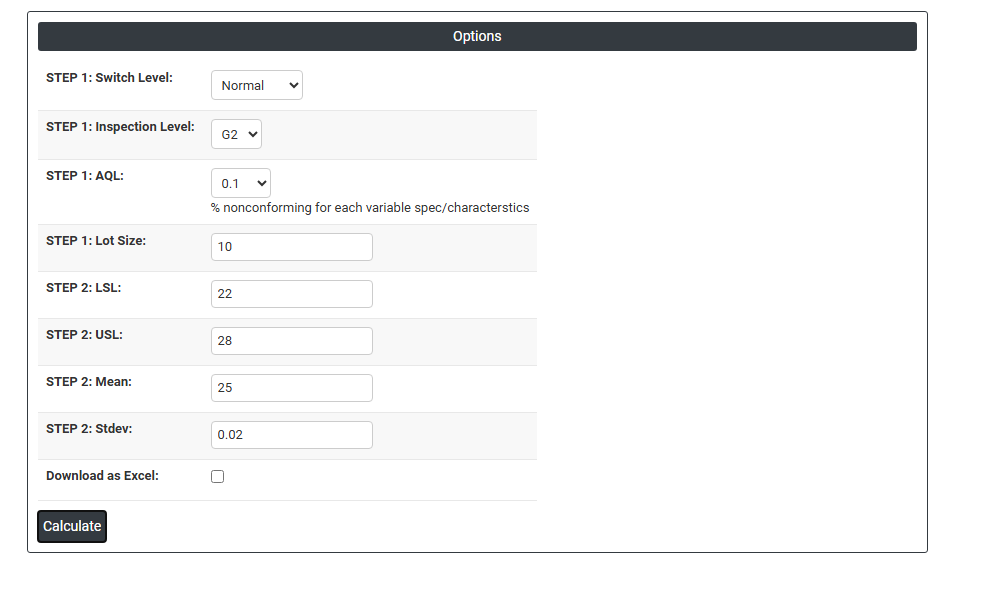
2. Now analyses the data with the help of https://qtools.zometric.com/ or https://intelliqs.zometric.com/.
3. To find Variable AQL sampling plans choose https://intelliqs.zometric.com/> Statistical module> Sampling >Variable AQL sampling plans.
4. After using the above mentioned tool, fetches the output as follows:

How to do Variable AQL sampling plans
The guide is as follows:
- Login in to QTools account with the help of https://qtools.zometric.com/ or https://intelliqs.zometric.com/
- On the home page, choose Statistical Tool> Sampling>Variable AQL sampling plans.
- Next, you need to fill the required options.
- Finally, click on calculate at the bottom of the page and you will get desired results.
On the dashboard of Variable AQL sampling plans, the window is separated into two parts.
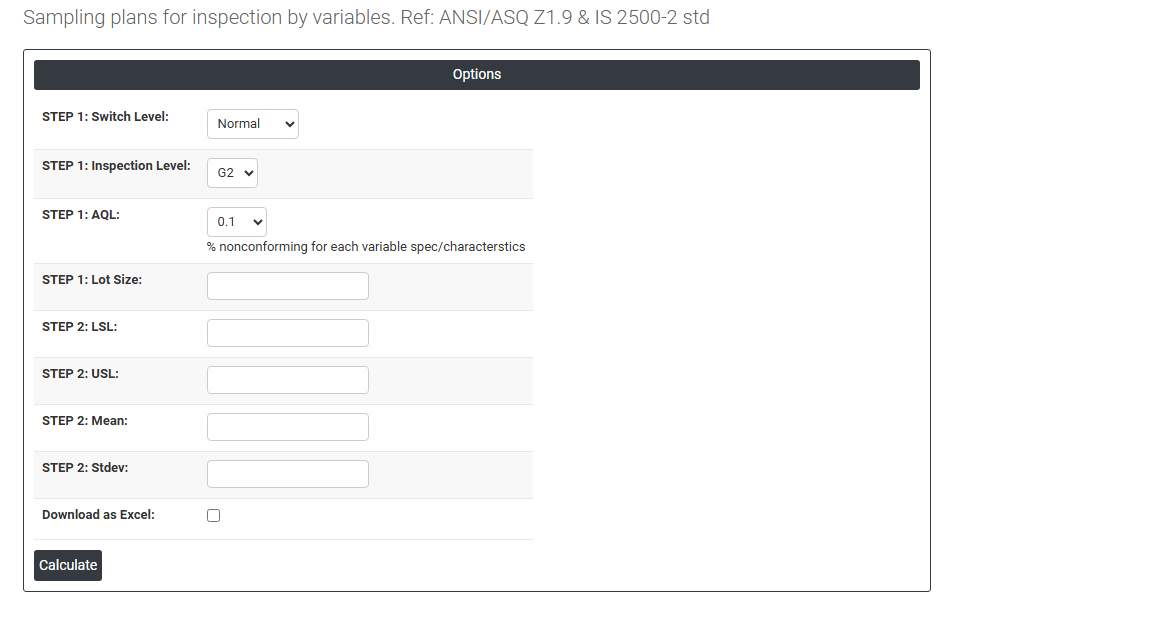
Load example: Sample data will be loaded.
On the right part, there are many options present as follows:
Step 1 Options
- Switch Level — sControls which version of the sampling plan is currently active based on recent inspection history:
- Normal: the standard plan used under typical process conditions.
- Tightened: activated when recent lots have shown poor quality; uses stricter acceptance criteria to provide greater protection.
- Reduced: activated when the process has demonstrated consistently good quality; uses smaller sample sizes to reduce inspection cost.
- Inspection Level: G1, G2, G3, S3, S4 define the discriminating power of the plan. G2 is the standard default; special levels S3 and S4 are used when very small samples are needed.
- AQL: Select the Acceptable Quality Level from the standardised list, representing the maximum proportion of non-conforming items considered acceptable from the producer's perspective.
- Lot Size: The total number of items in the batch being inspected. Determines the sample size from the variable sampling tables.
Step 2 Options
- LSL (Lower Specification Limit): The minimum acceptable value for the measured characteristic. Items measuring below this value are non-conforming.
- USL (Upper Specification Limit): The maximum acceptable value for the measured characteristic. Items measuring above this value are non-conforming.
- Mean: The expected or known process average for the characteristic being measured. Used in the variable sampling calculation to assess what proportion of the population falls outside specification.
- Stdev (Standard Deviation): The expected or known process standard deviation. Along with the mean, this determines the estimated proportion non-conforming used in the accept/reject calculation.
- Preferred AQL: Select the Acceptable Quality Level from the standardised list. This defines the quality level considered acceptable from the producer's perspective. Smaller AQL values (e.g. 0.01, 0.04) provide tighter protection and are used for critical or safety-related characteristics. Larger values (e.g. 10, 25) are used for minor characteristics where higher defect rates are tolerable.
- Download as Excel: This will display the result in an Excel format.