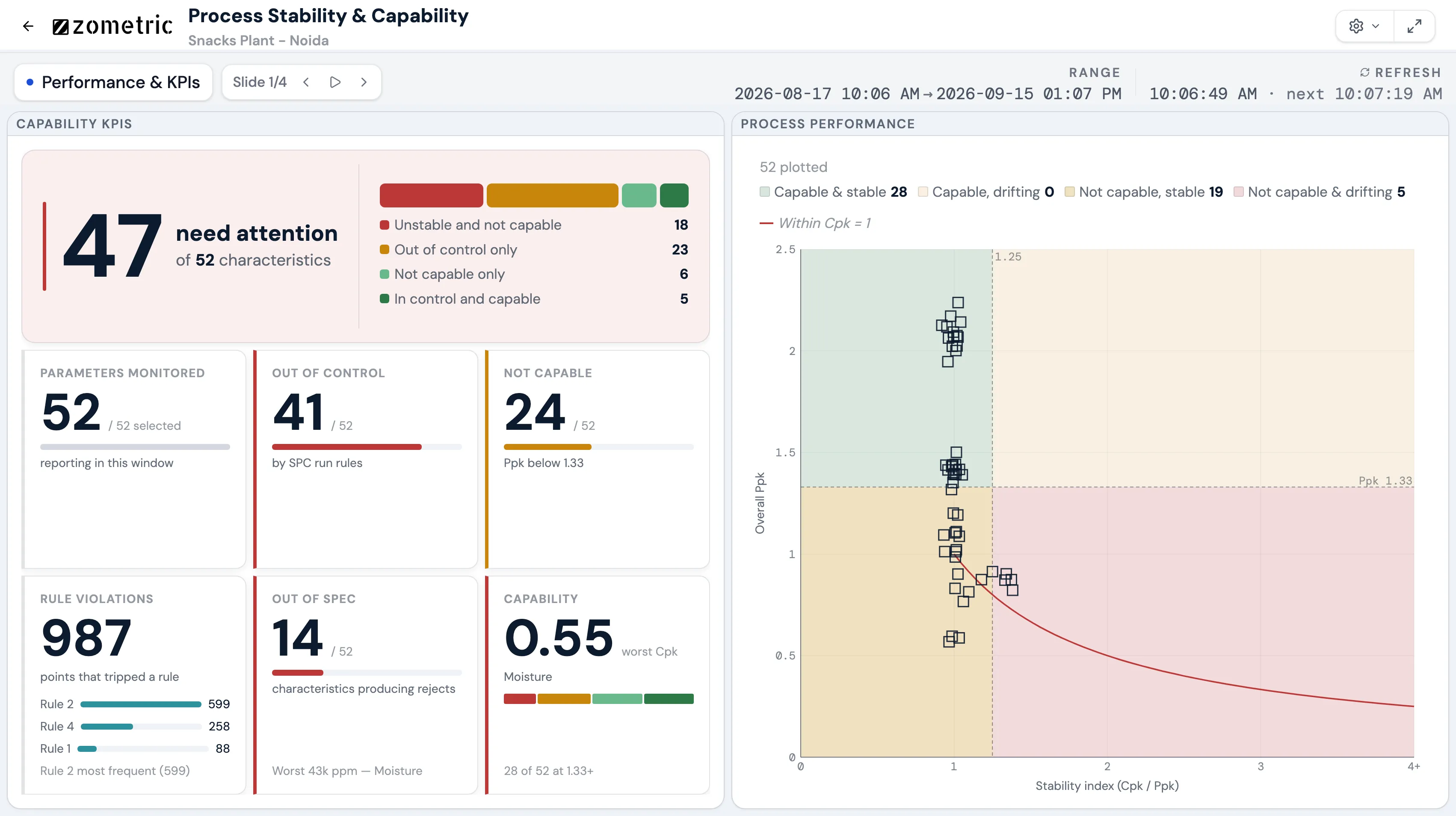
Zometric Live Dashboards put SPC on the shopfloor wall. Quality matrices, control charts and capability worklists refresh on their own, rotate as slides on a TV and scroll on a PC.
Process control chart · I-MRMoisture % · Line 2UCL 3.60CL 3.00LCL 2.40Rule 1 · 1 point beyond UCL · 3.81
Capability KPIsCapable: Cpk ≥ 1.33
9 of 48 schemes need attention
Out of control4
Not capable7
Worst Cpk0.82
The method
What is a live SPC dashboard?
A live SPC dashboard shows quality data on a screen as it is measured: readings against specification limits, control charts against control limits, and capability indices such as Cp, Cpk and Ppk. It runs unattended on a TV beside the line, or in a browser at a desk, and refreshes without anyone pressing a button.
Zometric Live Dashboards read the plant's quality data: variable readings (individuals and subgroups), defective and defect counts, and each scheme's stability and capability verdict. A scheme is one characteristic measured on one line, machine and product. Widgets sit on a 24-column grid. A TV dashboard is a fixed canvas that never scrolls, and its slides rotate. A PC dashboard is a scrolling grid. Both are built by dragging and resizing widgets from a catalog of 20 data-backed widget types.
The dashboard does not recalculate SPC. Control limits, run-rule results and Cp, Cpk and Ppk are shown exactly as the source calculated them, so the screen on the wall agrees with the SPC report. The dashboard only judges presentation: whether a reading is in spec, in the warning band or out of spec, and whether a scheme reaches the capability target each widget sets (1.33 by default, on Cpk or Ppk).
Why teams switch
Problems Zometric Live Dashboards remove
Six things quality and production teams say about the screens on their shopfloor, and what changes when the screen reads live SPC data.
01Freshness
The TV shows yesterday's numbers until someone updates the file.
With Zometric
Each dashboard pulls fresh data on its own, every 30 seconds by default, or at any preset from 5 seconds to 10 minutes. The header shows when the data was last refreshed and when the next refresh is due.
Automatic refresh
02Early warning
We find out a characteristic went out of spec in the end-of-shift report.
With Zometric
The quality matrix shows the latest reading of every characteristic, line and product against its limits, marked in spec, warning or out of spec. A reading that is out of spec in the current shift is highlighted as an alarm.
Quality matrix
03Trust
The chart on the wall says something different from the SPC report.
With Zometric
Control limits, run-rule counts and capability indices come from the source unchanged. Every widget that judges capability prints its own rule on screen, for example Cpk ≥ 1.33.
No recalculation
04Priorities
We track hundreds of characteristics and don't know which to fix first.
With Zometric
The SPC quadrant matrix splits schemes by stable and capable. Two worklists rank what to fix: the capability gap (Cp − Cpk) for schemes that only need recentring, and the stability gap (Cpk − Ppk) for schemes that drift over time.
Quadrant matrix and gap worklists
05Reliability
One bad data feed blanks the whole screen.
With Zometric
Each widget fetches and builds its own data. If one fails, only that widget shows an error and the rest keep updating. TV pages also reload themselves once a night at 03:00 local time, so a browser left open for weeks stays healthy.
Per-widget isolation
06Space
There is more to show than one screen can hold.
With Zometric
A TV dashboard is a set of slides that rotate, 15 seconds each by default. A widget with more data than fits pages itself, and the slide stays on screen until all of its pages have been shown.
Rotating slides and paging
How it works
How a live dashboard reaches the shopfloor
From connecting the data source to the TV on the wall, every step happens in the browser.
01
Setup · Data source
Connect the plant's data
Under Settings, Data sources, enter a URL and token for each of five functions: work units, shifts, schemes, quality records and capability. Each URL is tested against its published contract and is saved only if the test passes.
02
Setup · Work units
Bring in work units, shifts and schemes
Discover the work units the source serves and sync its shift pattern. Schemes, with their spec and warning limits, are synced for each work unit and refreshed again when they go stale.
03
Build · Dashboard
Create a TV or PC dashboard
Choose a TV screen, where slides rotate on a fixed canvas, or a PC grid that scrolls. You can also copy any dashboard in the tenant and point its widgets at this work unit's schemes.
04
Build · Widgets
Place and configure widgets
Pick widgets from the catalog, then drag and resize them on the 24-column grid. Set each widget's own scope: schemes, lines, equipment types or a filter, its capability target, and display settings such as text size and colour intensity. The panel previews the change as you make it.
05
Configure · Window and refresh
Set the time window and refresh rate
Choose how far back the dashboard looks: the last few shifts, a rolling number of days, weeks or months, or a fixed date range. Then choose how often it refreshes. A fixed range that lies fully in the past stops refreshing, because its data cannot change.
06
Release · Publish
Publish to the right audience
Every edit autosaves to a draft that viewers never see. Publishing releases it. A dashboard can be visible to everyone in the tenant or only to selected groups.
07
Run · TV wall
Run it on the TV
Slides rotate at the duration set for each one, with a progress bar showing when the screen will change. The header shows the data window and the last and next refresh times. Anyone at the screen can pause or step through the slides.
08
Share · Export
Take it to the meeting
Users with the export permission download every slide as a PDF or PowerPoint file, rendered at 1920 × 1080 with one slide per page.
Want to see Live Dashboards on your own process?
A 30-minute call covers your products, your customers' requirements and the tools you use today.
What it does
Live Dashboards — what you actually get.
Each capability is tied to a decision your team is already trying to make.
Drag-and-Drop Layout
Pick widgets from a catalog of 20 and drag and resize them on a 24-column grid, on rotating TV slides or a scrolling PC page. Edits autosave to a draft that viewers never see until you publish.
Self-Updating
Each dashboard pulls fresh data every 30 seconds by default, or at any preset from 5 seconds to 10 minutes. The header shows the last and next refresh times, and a past fixed date range stops refreshing because it cannot change.
Quality Matrix
Every characteristic, line and product against its spec limits on one board, marked in spec, warning or out of spec. A current-shift reading outside spec is highlighted as an alarm.
24×7 Shopfloor Operation
Built for TVs left on for weeks: each widget fetches its own data, so one failure shows an error on that widget only while the rest keep updating, and the page reloads itself once a night at 03:00.
SPC as Your Source Calculated It
Control limits, run-rule counts and Cp, Cpk and Ppk are shown exactly as the SPC system calculated them, never recomputed, so the wall agrees with the SPC report.
Capability Worklists
The SPC quadrant matrix, capability KPI card and capability- and stability-gap worklists show which of hundreds of schemes need attention first, each against the target the widget sets (Cpk 1.33 by default).
In numbers
How a quality matrix card decides in spec, warning or out of spec
Each card in the quality matrix shows the latest reading of one scheme in the current shift. If the shift has no reading yet, it shows the last recorded one, marked as the last run. The reading is out of spec if it falls below the LSL or above the USL. It is in the warning band if it falls outside the scheme's warning limits. If the scheme has no warning limits, the warning band is the outer 15% of the spec band on each side.
1
In spec
2
Warning
1
Out of spec
One food line, current shift, four schemes
Scheme
LSL
USL
Warning limits
Reading
Status
Moisture %, Line 1
LSL2.00
USL4.00
Warning limits2.30 – 3.70 (15% rule)
Reading3.12
StatusIn spec
Moisture %, Line 2
LSL2.00
USL4.00
Warning limits2.30 – 3.70 (15% rule)
Reading3.81
StatusWarning
Salt %, Line 1
LSL1.10
USL1.60
Warning limits1.20 – 1.50 (configured)
Reading1.64
StatusOut of spec
Bulk density g/l, Line 1
LSL380
USL440
Warning limits389 – 431 (15% rule)
Reading386
StatusWarning
Moisture has no warning limits, so the margin is 15% of the 2.00 spec band: 0.30 on each side, giving 2.30 to 3.70. A reading of 3.81 is inside spec but above 3.70, so it is a warning. Salt has configured warning limits of 1.20 and 1.50, but 1.64 is above the USL of 1.60, so it is out of spec, and because it was read in the current shift the card is highlighted as an alarm. Bulk density has a 60 g/l spec band, so the margin is 9 g/l and the band runs from 389 to 431. A reading of 386 is a warning.
Connected modules
How Live Dashboards connect to the rest of Zometric
Live Dashboards read quality data. They do not write anything back.
Zometric Live DashboardsReloads itself once a night at 03:00 local time
Who sees what
Spreadsheet, static report or generic chart pageAnyone with the file or the link
Zometric Live DashboardsDraft and published versions, with visibility by group
Meetings
Spreadsheet, static report or generic chart pageScreenshots pasted into slides
Zometric Live DashboardsEvery slide exported to PDF or PowerPoint
Want to see Live Dashboards on your own process?
A 30-minute call covers your products, your customers' requirements and the tools you use today.
Integrations
Data in and out
Data-source contracts
Five functions (work units, shifts, schemes, quality records and capability), each called by POST with a JSON body and its own token. Every contract is documented on the help page, and a URL is saved only after its answer passes the contract test.
Scheme and shift sync
Schemes and their limits are synced from the source for each work unit, and the shift pattern for the tenant. A scheme that stops appearing in the source is treated as retired and hidden.
PDF and PowerPoint export
Every slide of a dashboard is rendered at 1920 × 1080 and saved as one PDF page or one PowerPoint slide each.
FAQ
Live Dashboards: frequently asked questions
Straight answers to the questions teams ask before a demo.
What is a live SPC dashboard?
A live SPC dashboard shows quality data on a screen as it is measured: readings against spec limits, control charts against control limits, and capability indices such as Cp, Cpk and Ppk. Zometric Live Dashboards run unattended on shopfloor TVs as rotating slides, or in a browser on a PC, and refresh without anyone pressing a button.
What data can Zometric Live Dashboards show?
Quality data: variable readings (individuals and subgroups), defective and defect counts, and each scheme's stability and capability verdict, for the work units and shifts the source defines. The dashboards read five functions from the source: work units, shifts, schemes, quality records and capability.
How often do the dashboards refresh?
Every 30 seconds by default. Each dashboard can be set to 5, 10 or 30 seconds, or 1, 2, 5 or 10 minutes. A dashboard fixed to a date range that lies fully in the past stops refreshing, because its data cannot change.
Do the dashboards recalculate control limits or Cpk?
No. Control limits, run-rule counts and Cp, Cpk and Ppk are shown exactly as the source calculated them, so the dashboard agrees with the SPC report. A widget only compares the index with its own capability target, 1.33 on Cpk by default, and prints that rule on screen.
How do you fit many charts on one TV screen?
A TV dashboard is a set of slides on a fixed 24-column canvas that never scrolls. Slides rotate, 15 seconds each by default. A widget with more data than fits pages itself, and the slide stays up until every page has been shown. Several charts can also share one page.
Are the dashboards built by drag and drop?
Yes. Editors pick widgets from a catalog and drag and resize them on a 24-column grid, on TV slides and on PC grids. Each widget is then configured in a panel that previews the change, and nothing reaches viewers until the dashboard is published.
Can different people see different dashboards?
Yes. A dashboard is visible either to everyone in the tenant or only to selected groups, and viewers only ever see published dashboards. Editing, exporting, deciding who sees which dashboard, and managing data sources are separate permissions.
Can I export a dashboard to PowerPoint or PDF?
Yes, with the export permission. Every slide is rendered at 1920 × 1080 and saved as one PDF page or one PowerPoint slide each.
Better Together
Modules that work alongside this one.
Zometric's modules share a single data backbone — adopting more of them compounds the signal-to-noise advantage.