
Audit Plan
On this page
Purpose
Audit Plan sets out the audits that keep an improvement in place after a project closes: what is checked, how often, what counts as a pass, where the evidence is kept and which document governs it. It is a Control-phase document. The header (project, document number, approval and revision) is typed in the Options panel, and the audits come from the worksheet, one row per criterion. Create report lays the plan out as a single document that can be filed with the control plan or handed to the process owner.
Key Capabilities
- One report with the project header, Document Details, the Audits Table and the Audit Description.
- Audits Table read from worksheet columns recognised by name, so a plan kept in Excel can be pasted in as it is.
- Several criteria can share one audit number: each row is one thing the auditor checks.
- Dates shown in a fixed day-month-year form (for example 15-Nov-2026), whatever the browser's date format.
- Blank fields stay in the report, so the plan shows what is still to be filled in (for example the approval date).
- PDF export via Download.
Statistical Methods
The tool does no calculation: it lays out what you enter. It follows the usual Lean Six Sigma Control-phase practice for audits of a new process: each audit names a scope (the control being checked), a frequency, pass criteria that can be answered yes or no, the place where the evidence is kept, and the controlling document (SOP, work instruction, control plan) the auditor checks against.
Worksheet columns are matched by their heading, ignoring case and treating underscores as spaces: Audit # (also Audit No., Audit Number or Audit), Frequency, Description/Scope (also Description or Scope), Criteria, Location of Data (also Location) and Reference. The table needs a Frequency column, or failing that a Description/Scope column; without either it is shown empty. Rows that are blank in every recognised column are skipped, and other columns are ignored. The worksheet can also be left empty to print a blank plan.
A good audit plan covers every control in the control plan that can drift back: settings, maintenance tasks, training and the use of control charts. Give each criterion a clear pass or fail, keep frequencies realistic for the people who will do them, and review the plan when the process changes (update Last Revised By, Last Revised Date and Revision #).
Input Fields & Options
Field | Description |
Project Name / Prepared By / Prepared Date | Header of the report: the project the audits belong to, who prepared the plan and when. |
Document # | Document number of the audit plan in your document control system. |
Approved By / Approved Date | Who approved the plan and when. |
Last Revised By / Last Revised Date / Revision # | Revision history: who changed the plan last, when, and the current revision. |
Audit Description | Free text shown under the Audits Table: the purpose of the audits, for example which project's controls they protect. |
Worksheet | One row per audit criterion, with columns Audit #, Frequency, Description/Scope, Criteria, Location of Data and Reference. Load Example fills in a complete plan. |
Create report | Lays out the plan in the Output panel. |
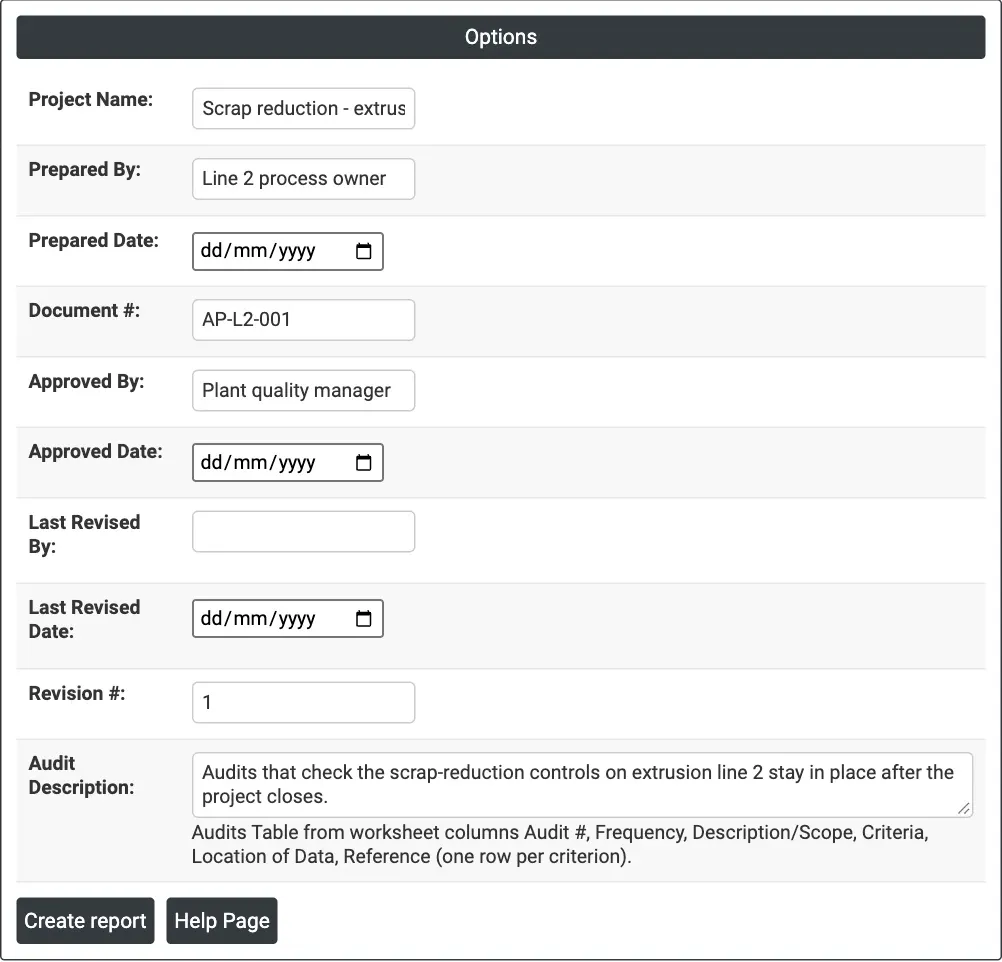
Figure 1 — Options for the example: header and document details of audit plan AP-L2-001 for the scrap-reduction project on extrusion line 2.
Output Descriptions
- Audit Plan — Project Name, Prepared By and Prepared Date.
- Document Details — Document #, Approved By, Approved Date, Last Revised By, Last Revised Date and Revision #.
- Audits Table — one row per criterion: Audit #, Frequency, Description/Scope, Criteria, Location of Data and Reference.
- Audit Description — the text typed in the Options panel.
- PDF export via Download.
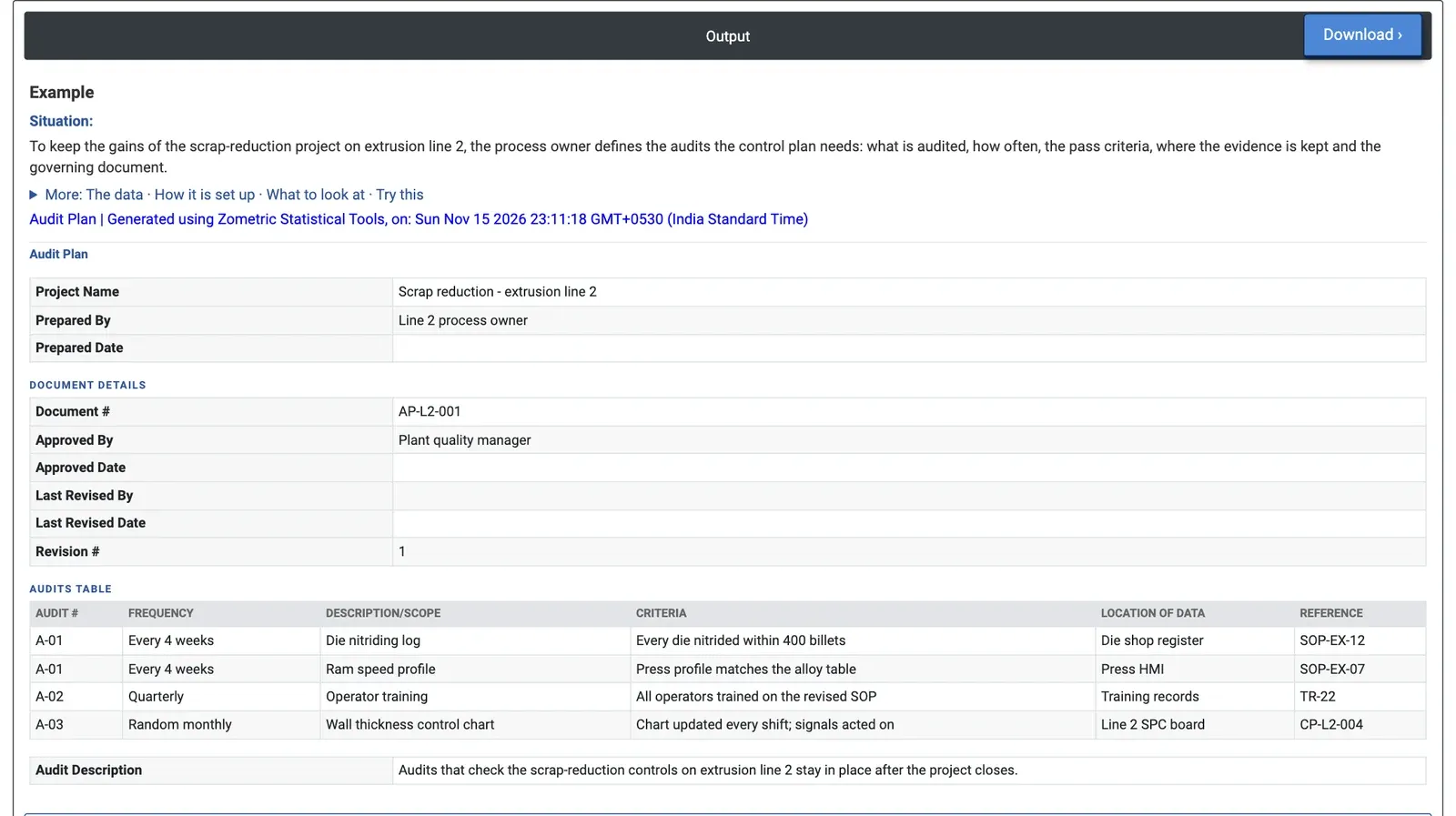
Figure 2 — The audit plan for extrusion line 2: three audits (A-01 to A-03) covering four criteria, each with its frequency, evidence location and reference document.
Worked Example
A scrap-reduction project on extrusion line 2 is closing, and the line's process owner must make sure the new controls stay in place. The worksheet lists four criteria. Audit A-01, every 4 weeks, checks the die nitriding log (every die nitrided within 400 billets, evidence in the die shop register, reference SOP-EX-12) and the ram speed profile (press profile matches the alloy table, evidence on the press HMI, SOP-EX-07). Audit A-02, quarterly, checks that all operators are trained on the revised SOP (training records, TR-22). Audit A-03, at random each month, checks that the wall thickness control chart is updated every shift and its signals acted on (line 2 SPC board, CP-L2-004).
In the Options panel the process owner enters the project name, Prepared By = Line 2 process owner, Document # = AP-L2-001, Approved By = Plant quality manager, Revision # = 1 and a one-line Audit Description, then presses Create report. The report shows the plan in one place: each criterion can be answered yes or no, and each points to the document an auditor checks against. Prepared Date, Approved Date and the Last Revised fields are still blank, which tells the team the plan has not yet been formally dated and approved. Once it is, the plan is filed with the control plan and the first A-01 audit is scheduled.