
CTQ Tree
On this page
Purpose
A CTQ (critical to quality) tree turns a vague customer need, such as “good quality and on time”, into requirements that can be measured and given a limit. The need is the root of the tree, the drivers (the areas the customer cares about) form the second level, and the measurable requirements the third. Use it in the Define phase to agree the project Y with the customer, or whenever a voice-of-the-customer statement must become a specification.
Key Capabilities
- Draws the tree top-down: the need at the top, the drivers below it, and each driver's requirements below that.
- Drivers and requirements read from two worksheet columns, one requirement per row.
- A driver repeated on several rows, even rows apart, collects all their requirements under one box.
- A driver with no requirements is still drawn, to show a branch not yet broken down.
- A table of the tree, one row per requirement, that can be copied into a project charter or data collection plan.
- PDF export via Download.
Statistical Methods
The tool does no calculation: it draws the tree from the worksheet. It follows the usual Six Sigma practice for a CTQ tree: start from the customer's need in their own words, break it into a few drivers, and break each driver into requirements that are specific and measurable, each with a target or limit (for example wall thickness 2.0 ± 0.1 mm). A requirement that cannot be measured yet needs an operational definition before it can be a project Y.
Worksheet columns are matched by heading, ignoring case. The driver column can be named Driver, Drivers, Key Driver, Need, Affinity or Level 2; the requirement column Requirement, Requirements, CTQ, CTQ Requirement, Input or Level 3. The driver column is required; the requirement column is optional. A row with a requirement but a blank driver cell is added to the driver above it, so the driver need only be typed once. Drivers appear in the order they first occur. If Critical to is left blank, the root box reads “Critical to”.
Input Fields & Options
Field | Description |
Critical to | The top of the tree: the customer's need, e.g. “Profile quality”. Blank = “Critical to”. |
Worksheet | Column Driver (level 2) and column Requirement (level 3), one requirement per row. Load Example fills in a complete tree. |
Create report | Draws the tree and the table. |

Figure 1 — Options for the example: Critical to = Good quality and on time.
Output Descriptions
- CTQ Tree (diagram) — the need in a dark red box at the top, each driver in a dark grey box, and each requirement in a light grey box below its driver.
- CTQ Tree (table) — one row per requirement: Critical to, Driver and Requirement.
- PDF export via Download.
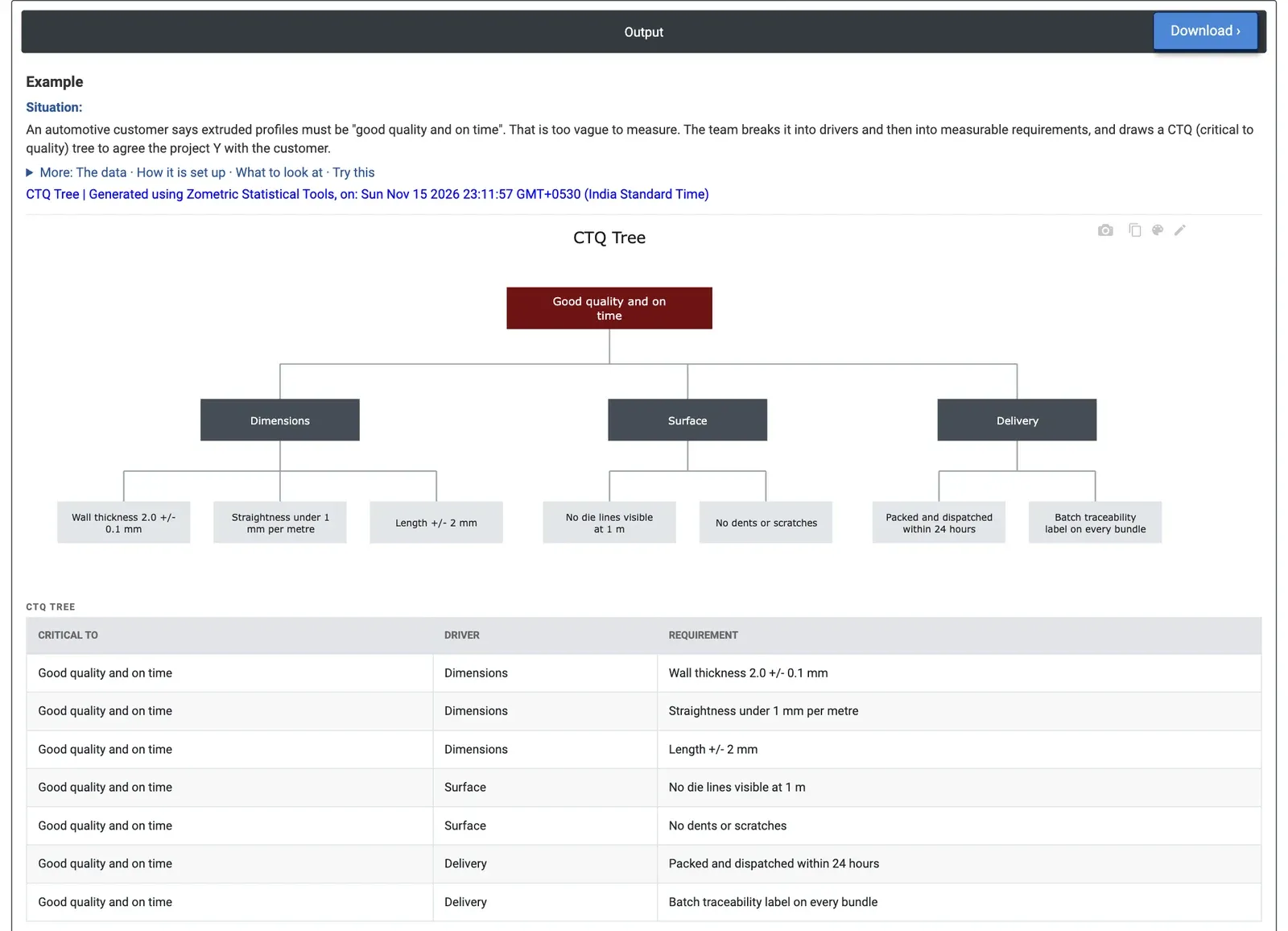
Figure 2 — CTQ tree for extruded profiles: three drivers (Dimensions, Surface, Delivery) and seven measurable requirements under “Good quality and on time”.
Worked Example
An automotive customer says its extruded profiles must be “good quality and on time”. That cannot be measured as it stands, so the extrusion team breaks it down with the customer. The worksheet holds one requirement per row with its driver, and Critical to is set to Good quality and on time.
The tree has three drivers and seven requirements. Dimensions has three: wall thickness 2.0 ± 0.1 mm, straightness under 1 mm per metre and length ± 2 mm. Surface has two: no die lines visible at 1 m and no dents or scratches. Delivery has two: packed and dispatched within 24 hours, and a batch traceability label on every bundle. The dimensional requirements already have numbers and limits, so they can become project Ys straight away. “No dents or scratches” has no number or inspection rule yet: before it can be measured the team must agree how it is inspected (lighting, distance, what size counts as a dent), for example in an operational definition in the Data Collection Plan.