
Preventative Maintenance
On this page
Purpose
Preventative Maintenance records the maintenance a piece of equipment needs to keep an improved process in control, and what triggers it: a number of cycles, an elapsed time, or a process parameter drifting towards its limit. It is a Control-phase document: when a project finds that the condition of a machine, die or tool drives the defects, this form makes the maintenance part of the standard way of working instead of something done when someone remembers. All fields are typed in the Options panel; Create report lays them out as one document.
Key Capabilities
- One report with the project header, Document Details, Process Details, the maintenance required and its three triggers.
- Three kinds of trigger side by side: Cycle Count, Elapsed Time and Parameter Value, each with how it is measured and how it is reported.
- Document control fields: who implemented the plan and when, the last revision, the revision number, the maintenance procedure and where the records are kept.
- Dates shown in a fixed day-month-year form (for example 09-Nov-2026).
- Blank fields stay in the report, so it shows what is still to be decided.
- PDF export via Download.
Statistical Methods
The tool does no calculation: it lays out what you enter. It follows the usual Total Productive Maintenance and Six Sigma Control-phase practice of tying maintenance to a trigger that can be checked. A cycle count trigger (for example every 400 billets, shots or strokes) suits wear that depends on use. An elapsed time trigger (for example every 4 weeks) suits wear or ageing that depends on time, and is the easiest to schedule. A parameter value trigger acts on the process itself: maintenance is called when a monitored characteristic leaves its limits or a control chart signals, which catches wear that the other two triggers miss.
For each trigger, say how it is measured (a counter, a calendar, a control chart) and how it is reported (a die card, the maintenance system, a meeting), so that someone is clearly responsible for acting on it. The parameter value trigger works best with a control chart on the characteristic: the chart signals a shift before parts go out of specification. Review the form when the equipment, the process or the maintenance procedure changes, and update Last Revised By, Last Revised Date and Revision #.
Input Fields & Options
Field | Description |
Project Name / Prepared By / Prepared Date | Header of the report. |
Implemented By / Implemented Date | Who put the maintenance plan into use, and when. |
Last Revised By / Last Revised Date / Revision # | Revision history of the plan. |
Engineering/Maintenance Procedure Reference | The procedure or work instruction that describes the maintenance. |
Records Location | Where the maintenance records are kept (for example the maintenance management system). |
Product/Service / Process / Process Step Description | What the equipment produces and the process step it serves. |
Description of Equipment / Location of Equipment | The equipment maintained and where it is. |
Preventative Maintenance Required | Free text: the maintenance tasks. |
Cycle Count Trigger: # of Cycles / How Measured / How Reported | Maintenance after a number of cycles, how the cycles are counted and how the count is reported. |
Elapsed Time Trigger: Elapsed Time / How Measured / How Reported | Maintenance after a time interval, how the time is tracked and how it is reported. |
Parameter Value Trigger: Parameter / USL / LSL / How Measured / How Reported | Maintenance when a process parameter goes outside its limits: the parameter, its upper and lower limits, how it is measured and how a breach is reported. |
Create report | Lays out the form in the Output panel. |
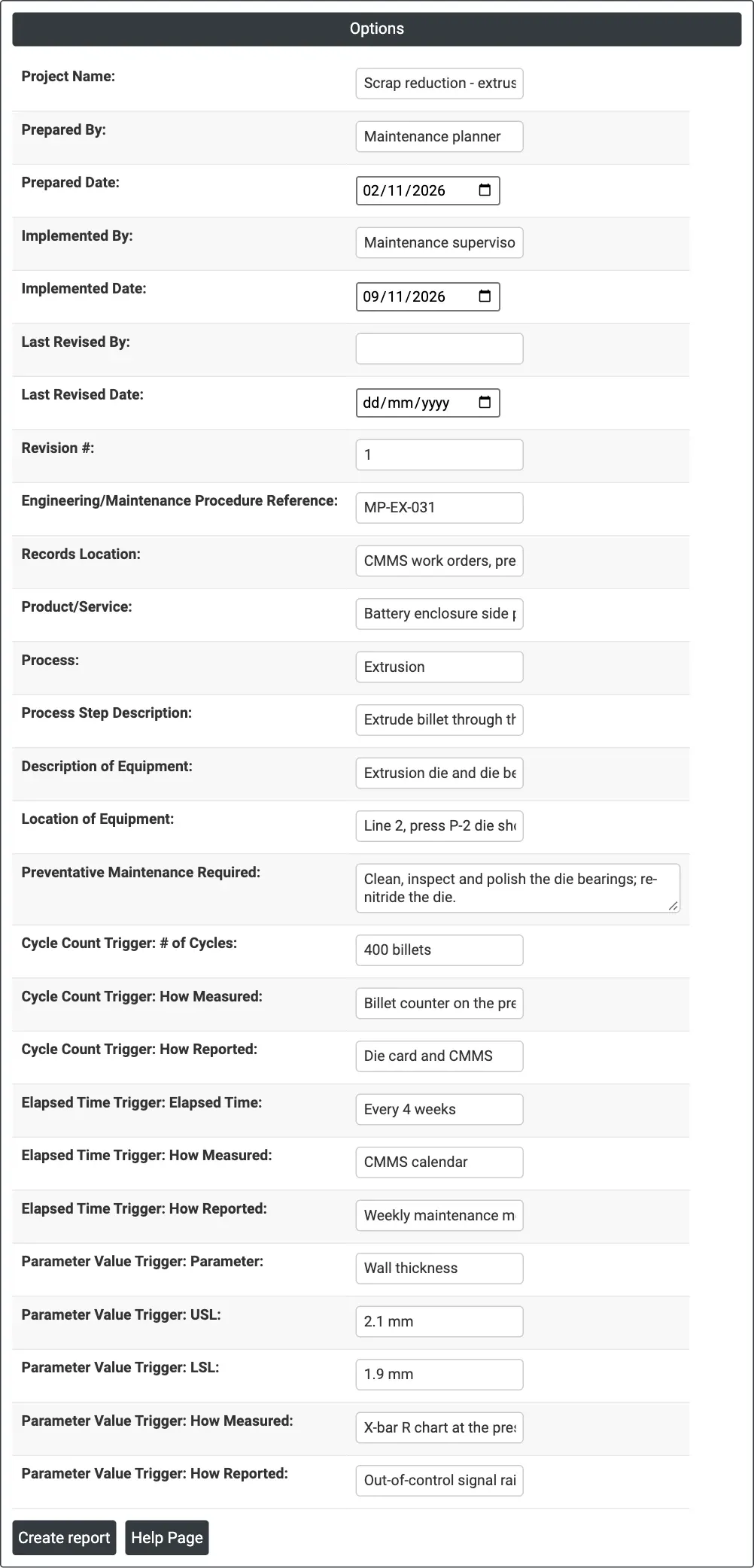
Figure 1 — Options filled in for the die maintenance plan of press P-2 on extrusion line 2.
Output Descriptions
- Preventative Maintenance — Project Name, Prepared By and Prepared Date.
- Document Details — Implemented By and Date, Last Revised By and Date, Revision #, procedure reference and records location.
- Process Details — Product/Service, Process, Process Step Description, Description of Equipment and Location of Equipment.
- Preventative Maintenance — the maintenance required.
- Cycle Count Trigger, Elapsed Time Trigger and Parameter Value Trigger — each trigger with how it is measured and reported.
- PDF export via Download.
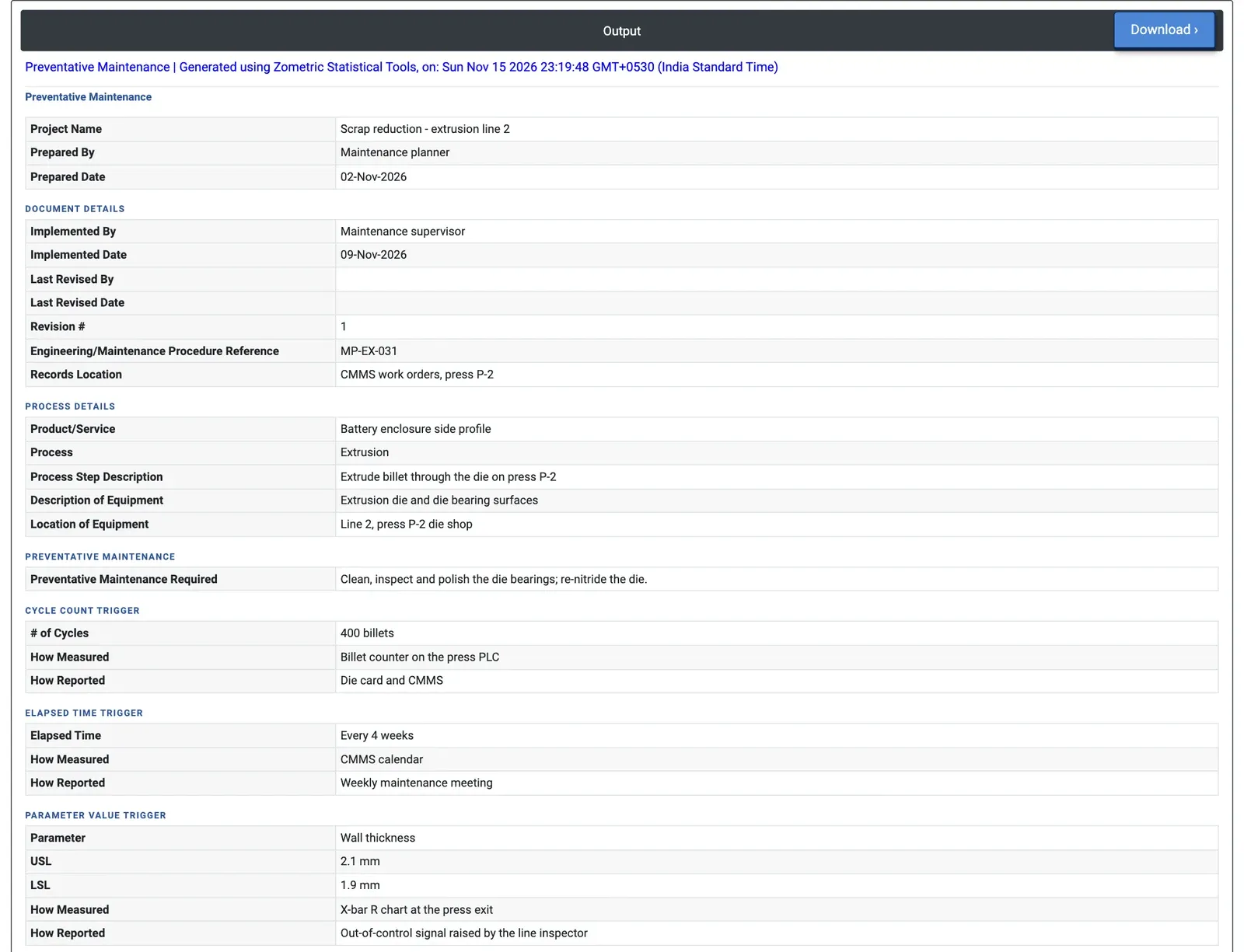
Figure 2 — The preventative maintenance plan for the extrusion die on press P-2, with cycle count, elapsed time and wall thickness triggers.
Worked Example
The scrap-reduction project on extrusion line 2 found that worn die bearings cause die lines and wall thickness drift. To hold the gain, the maintenance planner writes a preventative maintenance plan for the extrusion die on press P-2 (there is no Load Example for this page; the values below were typed in). The maintenance required is to clean, inspect and polish the die bearings and re-nitride the die, under procedure MP-EX-031, with records kept as work orders in the maintenance system.
Three triggers are set. Cycle count: every 400 billets, counted by the press PLC and reported on the die card. Elapsed time: every 4 weeks, from the maintenance calendar, reviewed at the weekly maintenance meeting. Parameter value: wall thickness, LSL 1.9 mm and USL 2.1 mm, monitored with the X-bar R chart at the press exit; an out-of-control signal raised by the line inspector calls for the die to be pulled early. The report shows the plan was prepared on 02-Nov-2026 and implemented on 09-Nov-2026, revision 1. Whichever trigger comes first starts the maintenance, and the audit plan for the line can check the die card against the 400-billet limit.