
Project Today
On this page
Purpose
Project Today is a one-page status report for an improvement project: who leads and sponsors it, its status and health, the phase it is in, whether it is ready for its next phase gate review, and the planned start and gate review dates of every phase. It answers the question a sponsor or steering committee asks at each review: where is the project now, and is it on plan? All fields are typed in the Options panel; Create report lays them out with a progress bar of the phases.
Key Capabilities
- Project header, Project Status & Progress and Current Phase in one report.
- A row of squares showing progress: one square per phase, filled up to and including the current phase.
- Phase Data table with the start date, phase gate review date and duration of each phase.
- Current Phase list covering DMAIC, CDOV, Kaizen, Just Do It, PDCA, Basic and 8D roadmaps.
- In the Workspace, the phase list follows the project's roadmap (up to eight phases); on the tool page the phases are the five DMAIC phases.
- PDF export via Download.
Statistical Methods
The tool does no calculation beyond dates. For each phase, Duration (days) = Phase Gate Review Date − Start Date, shown as * until both dates are set. Progress counts the phases up to and including the current one: with DMAIC phases and Current Phase = DMAIC - Improve, four of the five squares are filled. The part of the Current Phase after the dash is matched to the phase names, so a phase from another roadmap (for example PDCA - Check on a DMAIC project) fills no squares. Dates are shown as day-month-year.
The report follows the usual phase-gate (tollgate) practice of Six Sigma projects: each phase ends with a review at which the sponsor checks the phase deliverables and decides whether the project moves on. Ready for Phase Gate Review records whether the team believes the current phase is complete. Project Health is the team's own traffic-light rating (Green on plan, Yellow at risk, Red off plan); compare the gate review dates with today's date and the due date to judge whether the rating is fair.
Input Fields & Options
Field | Description |
Project Name / Project Leader / Sponsor | Header of the report. |
Methodology | 8D, Basic Project, DMAIC (default), CDOV, PDCA, Kaizen Event, Just Do It, QFD or Other. |
Status | Not Started (default), In Progress, Completed, On Hold or Cancelled. |
Start Date / Due Date | Project start and due dates. |
Project Health | Green, Yellow or Red. |
Current Phase | The phase the project is in, e.g. DMAIC - Measure, PDCA - Check, Kaizen - Day 3 or 8D - D4 through D5. |
Ready for Phase Gate Review | Yes or No. |
<Phase>: Start Date / <Phase>: Phase Gate Review Date | For each phase (Define, Measure, Analyze, Improve, Control on the tool page): when it starts and when its gate review is planned. |
Create report | Lays out the report. |
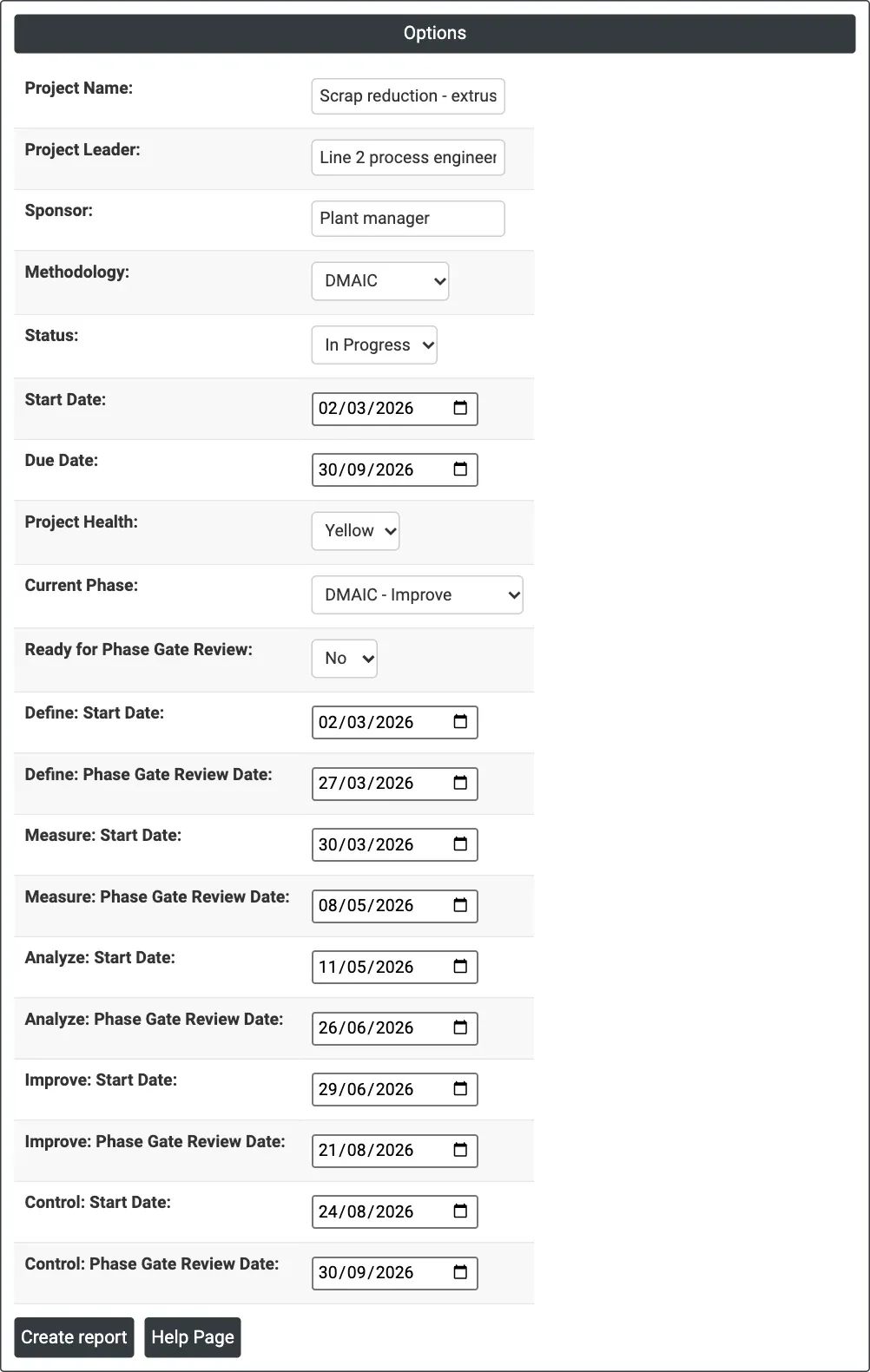
Figure 1 — Options filled in for the scrap-reduction project on extrusion line 2, in the Improve phase.
Output Descriptions
- Project Today — Project Name, Project Leader, Sponsor and Methodology.
- Project Status & Progress — Status, Start Date, Due Date and Project Health.
- Current Phase — Current Phase and Ready for Phase Gate Review, with the progress squares below.
- Phase Data — Order, Phase Name, Start Date, Phase Gate Review Date and Duration (days) for each phase.
- PDF export via Download.
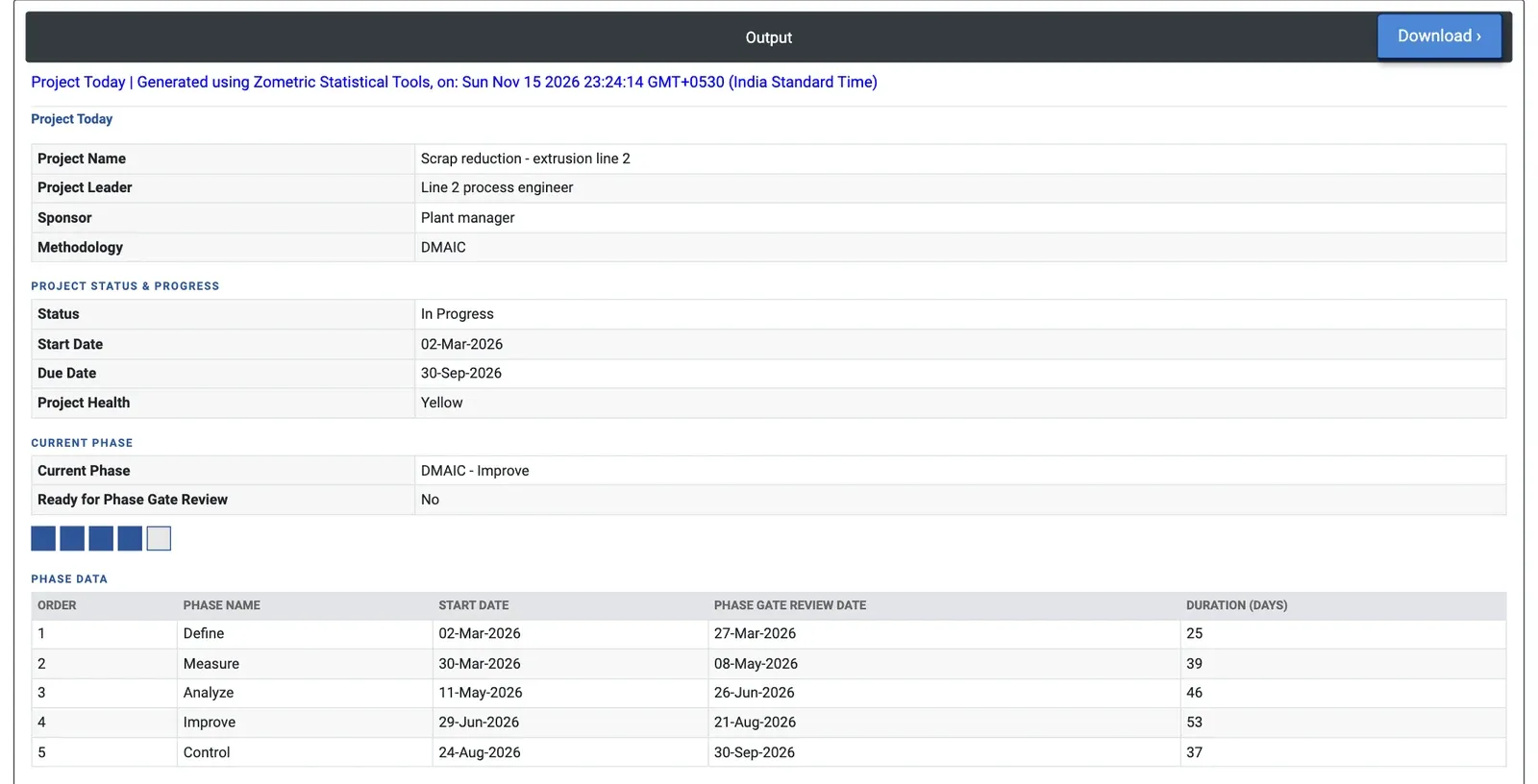
Figure 2 — Status of the extrusion project: in progress, health Yellow, in the Improve phase (four of five phases), with the planned dates of all five phases.
Worked Example
The leader of the scrap-reduction project on extrusion line 2 prepares the monthly status for the plant manager, who sponsors the project (there is no Load Example for this page; the values were typed in). The project started on 02-Mar-2026 and is due on 30-Sep-2026. It is In Progress, in the Improve phase, and not yet ready for the Improve gate review.
The progress squares show four of the five DMAIC phases reached. The Phase Data table gives the plan: Define 25 days (02-Mar to 27-Mar-2026), Measure 39 days, Analyze 46 days, Improve 53 days (29-Jun to 21-Aug-2026) and Control 37 days, ending on the due date of 30-Sep-2026. Improve is the longest phase because the pilot runs need die changes on a busy press. The leader rates the health Yellow: if the Improve gate slips past 21-Aug-2026, the Control phase is squeezed and the due date is at risk. The sponsor can act now, for example by booking press time for the pilot runs, rather than learn of the slip at the gate.