
Solution Implementation Checklist
On this page
Purpose
The Solution Implementation Checklist tracks what must be done before a chosen solution is rolled out and handed to the process owner: the measurement systems checked, the solution steps completed, the people told about the change, the project tools updated, the pilot's scope and the new settings of the critical inputs. Ticking the items as they are done and creating the report again shows at any time what is still open. Use it in the Improve phase, from the pilot to the hand-over.
Key Capabilities
- 22 standard checklist items in four sections: Measurement Systems, Solutions, Communication of Proposed Changes and Tools Updated to Reflect Changes.
- Each item shown as ☑ (done) or ☐ (open) in the report.
- Proposed solution, pilot scope and the record of changes during the pilot kept with the checklist.
- Settings of Critical Inputs table from the worksheet: each input's target, lower and upper limit and how it differs from the baseline.
- PDF export via Download.
Statistical Methods
The tool does no calculation: it lays out the checklist. The items follow the usual Six Sigma practice for implementing a solution. The measurement systems for the output and for the critical inputs must be verified after the change, so the improvement can be shown with data that can be trusted. Design documents, SOPs, technology systems and training must be changed and verified, equipment changes and Kaizen improvements documented, and the solution mistake-proofed where possible. Everyone affected (process owner, EHS, quality systems, engineering, IT, union leadership) must be told before the change, and the project's process map, C&E matrix, FMEA and list of potential inputs updated to reflect the new process.
The Settings of Critical Inputs table is read from worksheet columns matched by heading, ignoring case: Name of Input (also Input, X or Name), Target, Lower Limit (also Lower or LSL), Upper Limit (also Upper or USL) and Changes from Baseline / Comments (also Changes from Baseline, Comment or Comments). The Name of Input column is required for the table; rows blank in every recognised column are skipped. These settings become the operating window of the new process and the starting point of the control plan.
Input Fields & Options
Field | Description |
Project Name / Prepared By / Prepared Date | Header of the report. |
Proposed Solution | Free text: the solution being implemented. |
Scope of Pilot Implementation | Free text: where, on what and for how long the solution is piloted. |
Record of Changes to Inputs During Pilot (however minor) | Free text: every change made to the inputs during the pilot. Its help text names the worksheet columns of the Settings of Critical Inputs table. |
Measurement Systems: <item> | Two tick boxes: measurement system for the output verified after the solution; measurement system for the critical inputs tested and verified. |
Solutions: <item> | Ten tick boxes, from Selected best solution to Mistake-proofed the solution. |
Communication of Proposed Changes: <group> | Six tick boxes: Process Owner, Environmental, Health, and Safety, Quality Systems Group, Engineering, IT, Union Leadership. |
Tools Updated to Reflect Changes: <tool> | Four tick boxes: Process Map, C&E Matrix, FMEA, List of Potential Inputs (Process Map Data). |
Worksheet | Columns Name of Input, Target, Lower Limit, Upper Limit, Changes from Baseline / Comments. Load Example fills in a complete checklist. |
Create report | Lays out the checklist. |
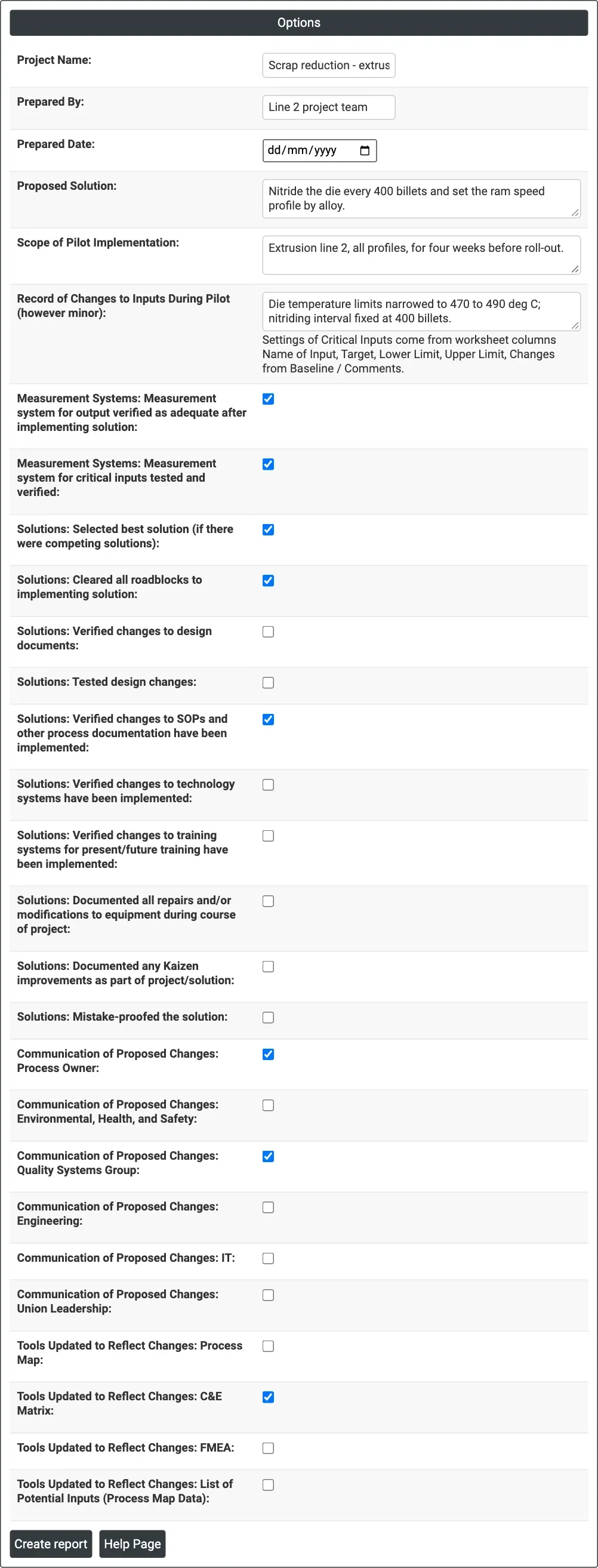
Figure 1 — Options for the example: the solution for extrusion line 2, its four-week pilot, and the checklist items done so far.
Output Descriptions
- Solution Implementation Checklist — Project Name, Prepared By and Prepared Date.
- Summary — the Proposed Solution.
- Measurement Systems, Solutions, Communication of Proposed Changes and Tools Updated to Reflect Changes — each item with ☑ or ☐.
- Pilot Scale-Up — Scope of Pilot Implementation and Record of Changes to Inputs During Pilot.
- Settings of Critical Inputs (X Variables) for Solution to be Implemented — Name of Input, Target, Lower Limit, Upper Limit and Changes from Baseline / Comments.
- PDF export via Download.
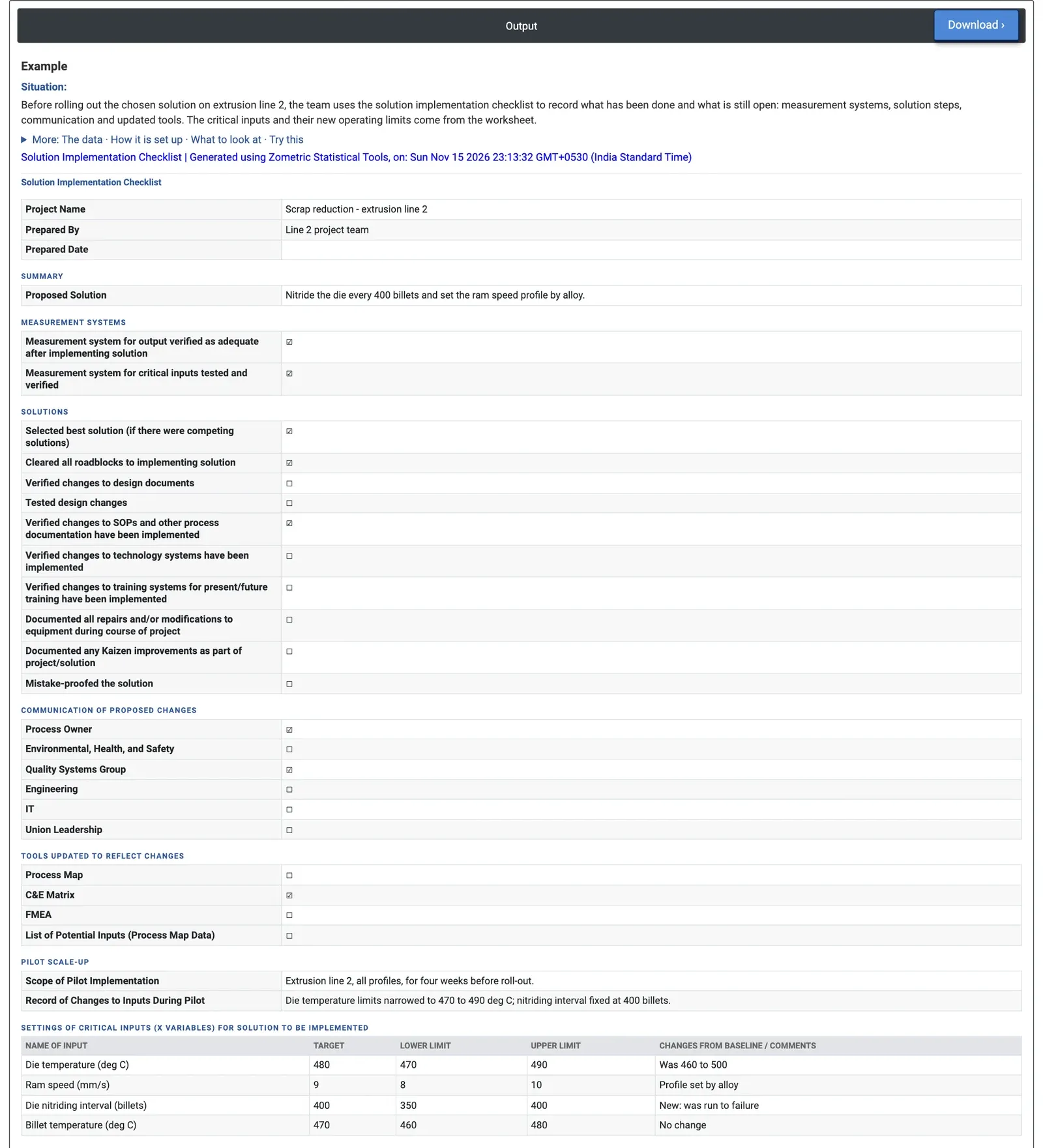
Figure 2 — The checklist for extrusion line 2: measurement systems verified, 3 of 10 solution items done, and the new operating windows of four critical inputs.
Worked Example
The extrusion team on line 2 has chosen its solution: nitride the die every 400 billets and set the ram speed profile by alloy. It is piloted on line 2, all profiles, for four weeks before roll-out, and during the pilot the die temperature limits were narrowed to 470 to 490 deg C and the nitriding interval fixed at 400 billets. The team ticks the items already done and loads the critical input settings into the worksheet.
The report shows both measurement system checks done. Of the ten solution items, three are done (best solution selected, roadblocks cleared, SOP changes verified); design documents, design tests, technology systems, training, equipment records, Kaizen records and mistake-proofing are still open. The process owner and the quality systems group have been told, but not EHS, engineering, IT or union leadership, and only the C&E matrix has been updated, not the process map, FMEA or list of inputs. The Settings of Critical Inputs give the new windows: die temperature 480 deg C (470 to 490, was 460 to 500), ram speed 9 mm/s (8 to 10, profile set by alloy), die nitriding interval 400 billets (350 to 400, previously run to failure) and billet temperature 470 deg C (460 to 480, no change). Before hand-over the team must close the open items, above all training and mistake-proofing, and carry the four input windows into the control plan.