
Team Members & Roles
On this page
Purpose
Team Members & Roles records who is on an improvement project and who holds its key roles: the project leader, the mentor or coach, the champion, the sponsor, the executive, the financial analyst who signs off the savings and the owner of the process being improved. The roles are typed in the Options panel and the team list comes from the worksheet, so one report shows everyone involved and how to reach them. Use it in the Define phase alongside the project charter, and keep it current as people join or leave.
Key Capabilities
- Team Roles: seven standard Lean Six Sigma project roles in one table.
- Team Members table from worksheet columns Name, Email, Role, Department, Job Title and Business Phone.
- Columns recognised by name, with common alternatives (for example Member, Dept, Designation, Phone or Mobile).
- Blank roles stay in the report, so it shows which roles are still to be filled.
- PDF export via Download.
Statistical Methods
The tool does no calculation: it lays out the team. It follows the usual Six Sigma project structure. The sponsor owns the business result and approves the charter; the champion removes barriers across departments; the executive or VP sponsors the improvement programme; the mentor or coach (often a Black Belt or Master Black Belt) guides the method; the project leader (Green or Black Belt) runs the project day to day; the financial analyst validates the savings; and the process owner will run the improved process after hand-over. The core team members bring knowledge of the process, and usually include the people who work in it.
Worksheet columns are matched by heading, ignoring case: Name (also Member or Team Member, required for the table), Email (or E-mail), Role, Department (or Dept), Job Title (also Title or Designation) and Business Phone (also Phone, Mobile or Contact). Rows with a blank name are skipped. If the worksheet has no Name column, the Team Members table is shown empty with its headings.
Input Fields & Options
Field | Description |
Project Name | Shown at the top of the report. Its help text lists the worksheet columns: Name, Email, Role, Department, Job Title and Business Phone. |
Project Leader / Mentor/Coach / Champion / Sponsor | Key project roles: who leads the project, who coaches the method, who removes barriers and who owns the business result. |
Executive/VP / Financial Analyst / Process Owner | The executive sponsor, the person who validates the savings and the person who will own the improved process. |
Worksheet | One team member per row with the columns above. Load Example fills in a team of five. |
Create report | Lays out the roles and the team. |
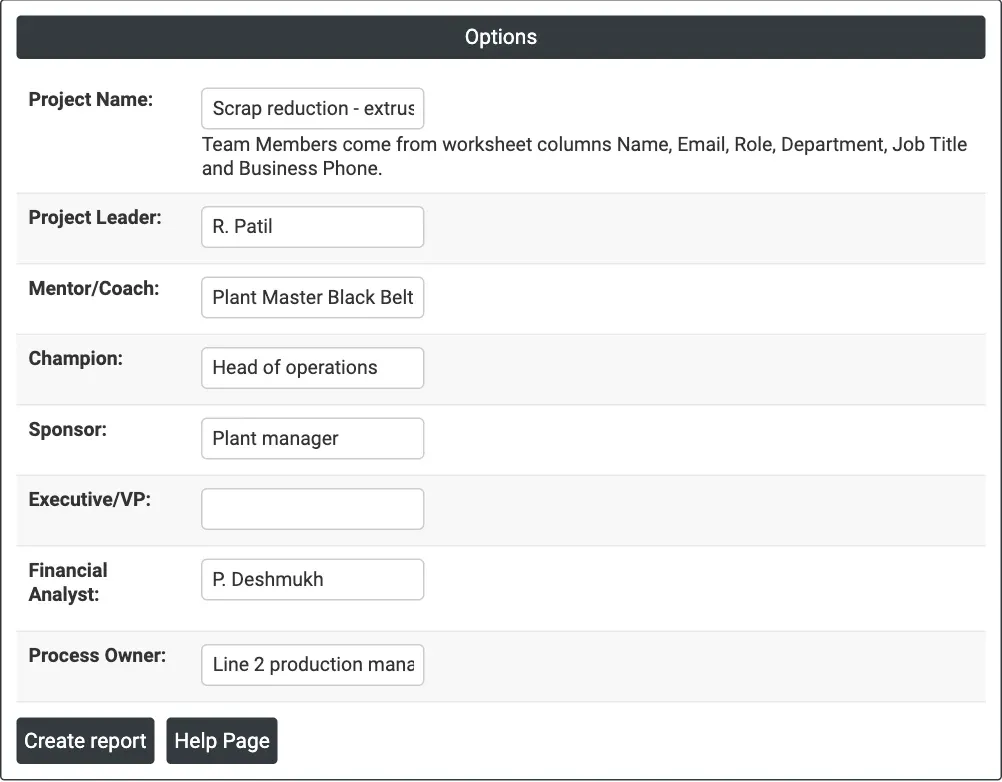
Figure 1 — Team roles entered for the scrap-reduction project on extrusion line 2; Executive/VP is left blank.
Output Descriptions
- Team Members & Roles — the Project Name.
- Team Roles — Project Leader, Mentor/Coach, Champion, Sponsor, Executive/VP, Financial Analyst and Process Owner with the names entered.
- Team Members — Name, Email, Role, Department, Job Title and Business Phone of each member.
- PDF export via Download.
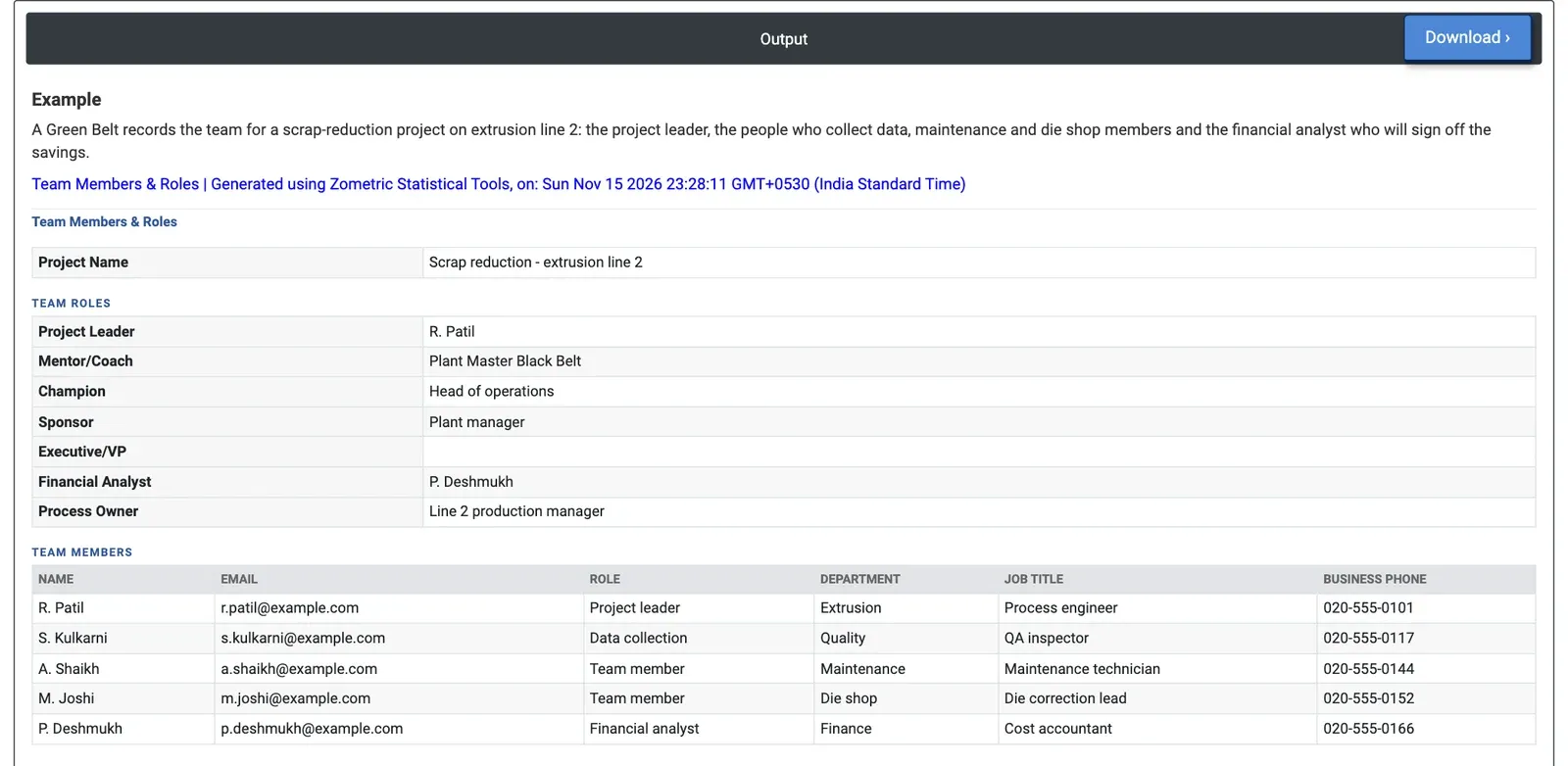
Figure 2 — The project's roles and its five team members from Extrusion, Quality, Maintenance, the Die shop and Finance.
Worked Example
A Green Belt sets up the team for a scrap-reduction project on extrusion line 2. Load Example fills in the project name and the five team members; the roles were typed in for this example. R. Patil, a process engineer in Extrusion, leads the project; S. Kulkarni, a QA inspector, collects the data; A. Shaikh from Maintenance and M. Joshi, die correction lead in the Die shop, are team members; and P. Deshmukh, a cost accountant in Finance, is the financial analyst. The plant manager sponsors the project, the head of operations is the champion, the plant Master Black Belt coaches and the line 2 production manager is the process owner.
The report puts all of this on one page with each member's email and phone, ready to attach to the charter. The team covers the functions that touch the problem: production, quality, maintenance and the die shop, with finance in place to sign off the savings from the start. Executive/VP is blank, which shows the gap at a glance: the team must decide whether the project needs an executive sponsor above the plant manager, or note that the role is not used, before the charter is approved.