
FMEA (Design and Process FMEA)
FMEA analyses design items (DFMEA) or process steps (PFMEA) for failure modes, effects, causes and controls. Each row needs severity, occurrence and detection ratings from 1 to 10. The tool computes RPN (S x O x D) and AIAG-VDA Action Priority before and after actions, and outputs the worksheet, a risk summary, priorities for action, a Pareto chart of RPN and review notes on worksheet gaps.
Last reviewed
Key takeaway
FMEA (Failure Mode and Effects Analysis) lists how a design or process can fail, the effect on the customer, the causes and current controls, then sets priorities for action using Action Priority and RPN.
On this page
Purpose
Failure Mode and Effects Analysis (FMEA) lists how a design or a process can fail, what each failure does to the customer, what causes it and how well the current controls prevent or detect it, then sets priorities for action. A Process FMEA (PFMEA) analyses the steps of the process flow diagram; a Design FMEA (DFMEA) analyses the items and functions of a design. The tool takes the FMEA worksheet, rates the priority of every row with the AIAG-VDA Action Priority and the RPN, before and after the actions, and reviews the worksheet for the gaps auditors usually find.
Key Capabilities
- Reads the worksheet with AIAG 4th edition or AIAG-VDA column headings; columns are recognised by name.
- Action Priority (High, Medium, Low) from the AIAG-VDA table, and RPN = S × O × D, for every row, and again after the actions from the revised ratings.
- Rows that continue the failure mode above (another cause) take the step, function, effect, severity and failure mode from the row above, as merged cells on a paper form.
- FMEA Worksheet grouped as Failure Analysis, Risk Analysis and Optimization, with the Action Priority cells coloured.
- Risk Summary, a chart of rows by Action Priority before and after the actions, Priorities for Action and a Pareto Chart of RPN.
- Review Notes on missing actions, severity consistency, revised ratings and detection ratings.
- Design or process FMEA from one tool; prioritize by Action Priority or by RPN.
- PDF export via Download.
Statistical Methods
Severity (S), Occurrence (O) and Detection (D) are whole numbers from 1 to 10. A rating outside that range, or not a number, is reported and the row is left unrated. RPN = S × O × D. Action Priority follows the AIAG-VDA FMEA Handbook (2019) table, which is the same for DFMEA and PFMEA: it looks up the severity band (9–10, 7–8, 4–6, 2–3, 1), the occurrence band (8–10, 6–7, 4–5, 2–3, 1) and the detection band (7–10, 5–6, 2–4, 1). Severity carries the most weight, then occurrence, then detection: for example S 9, O 5, D 6 is High, while S 4, O 5, D 8 is Medium although its RPN of 160 is close to the 270 of the first. Any severity 1 row, and any occurrence 1 row, is Low.
When any revised rating (New S, New O, New D) is given, the missing ones keep their original values and the revised RPN and Action Priority are computed. The Risk Summary counts each row at its current priority: the revised one where the row has been re-rated, the original otherwise. Priorities for Action lists the High rows and then the Medium rows, each group ordered by severity, then occurrence, then detection; with Prioritize by set to RPN it lists the rows in falling RPN order (at most 20; with an RPN threshold, only the rows at or above it).
The Review Notes apply the handbook's guidance. A High row needs an action that improves prevention or detection, or a record in Remarks of why the current controls are adequate; Medium rows without either are counted. Rows with severity 9–10 and High or Medium priority should be reviewed by management. Severity belongs to the effect, so the same effect rated with different severities is flagged. Other checks: actions without a responsible person or target date, actions taken without revised ratings, a revised severity lower than the original (it only falls when the change removes or reduces the effect), actions that did not lower the risk, rows without a cause, low detection or occurrence ratings with no control described, and, in a PFMEA, detection rated 1–4 for a visual or manual check, as the AIAG-VDA PFMEA detection table keeps 1–4 for machine-based detection.
Input Fields & Options
Field | Description |
Worksheet | One row per failure mode and cause. Required: Failure Mode, Severity (or S, Sev), Occurrence (or O, Occ), Detection (or D, Det). Optional: Step No., Process Step (or Item), Work Element, Function, Requirement, Failure Effect, Class (or Filter Code), Failure Cause, Prevention Controls, Detection Controls, Recommended Action, Detection Action, Responsibility, Target Date, Status, Action Taken, Completion Date, New S / New O / New D (the ratings after the actions), Remarks. A row with a blank Failure Mode is another cause of the failure mode above. |
Project Name | Report header; shared with the other forms in a Workspace roadmap project. |
FMEA Type | Process FMEA (PFMEA), the default, or Design FMEA (DFMEA). Sets the report title, the Process Step / Item heading and the responsibility label; the visual-inspection detection check applies to PFMEA only. |
Prioritize by | Action Priority (AIAG-VDA), the default, or RPN (AIAG 4th edition). RPN is shown either way. |
RPN threshold (optional) | Used when prioritizing by RPN: Priorities for Action lists the rows at or above it, and the Risk Summary counts them. |
Subject, FMEA ID Number, Part Number, Company Name, Plant / Engineering Location, Customer Name, Model Year / Program(s), Process / Design Responsibility, Cross-Functional Team, FMEA Start Date, FMEA Revision Date, Confidentiality Level | The FMEA header, as on the AIAG-VDA form. Confidentiality Level: Business Use, Proprietary or Confidential. |
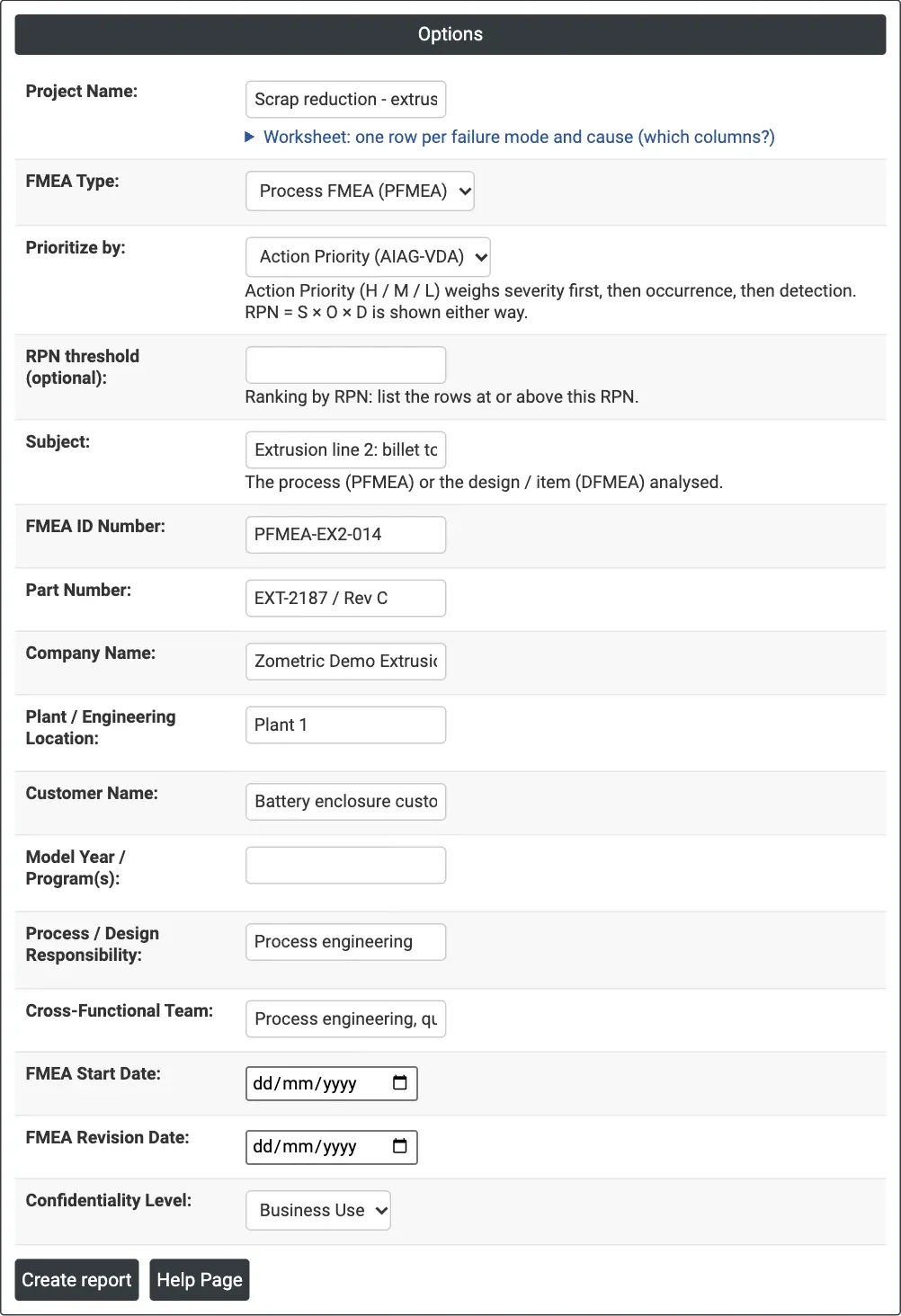
Figure 1 — Options for the example: PFMEA header for extrusion line 2, prioritized by Action Priority.
Output Descriptions
- Header — the FMEA header fields.
- FMEA Worksheet — the rows with RPN and Action Priority (H red, M orange, L green), and the revised S', O', D', RPN' and AP' where given. Columns the worksheet does not have are left out; cells that repeat the row above are shown blank.
- Risk Summary — rows, rows rated, rows by Action Priority, rows with severity 9–10, the highest RPN, rows with an action, and the rows by priority after the actions.
- Rows by Action Priority — bar chart before the actions and, when revised ratings exist, after them (hatched bars).
- Priorities for Action — the High and Medium rows in order, with the action (or the Remarks), responsibility, status and revised priority.
- Pareto Chart of RPN — the failure modes and causes by RPN (top 15), with the cumulative percentage.
- Review Notes — the worksheet findings; not shown when there are none.
- PDF export via Download.
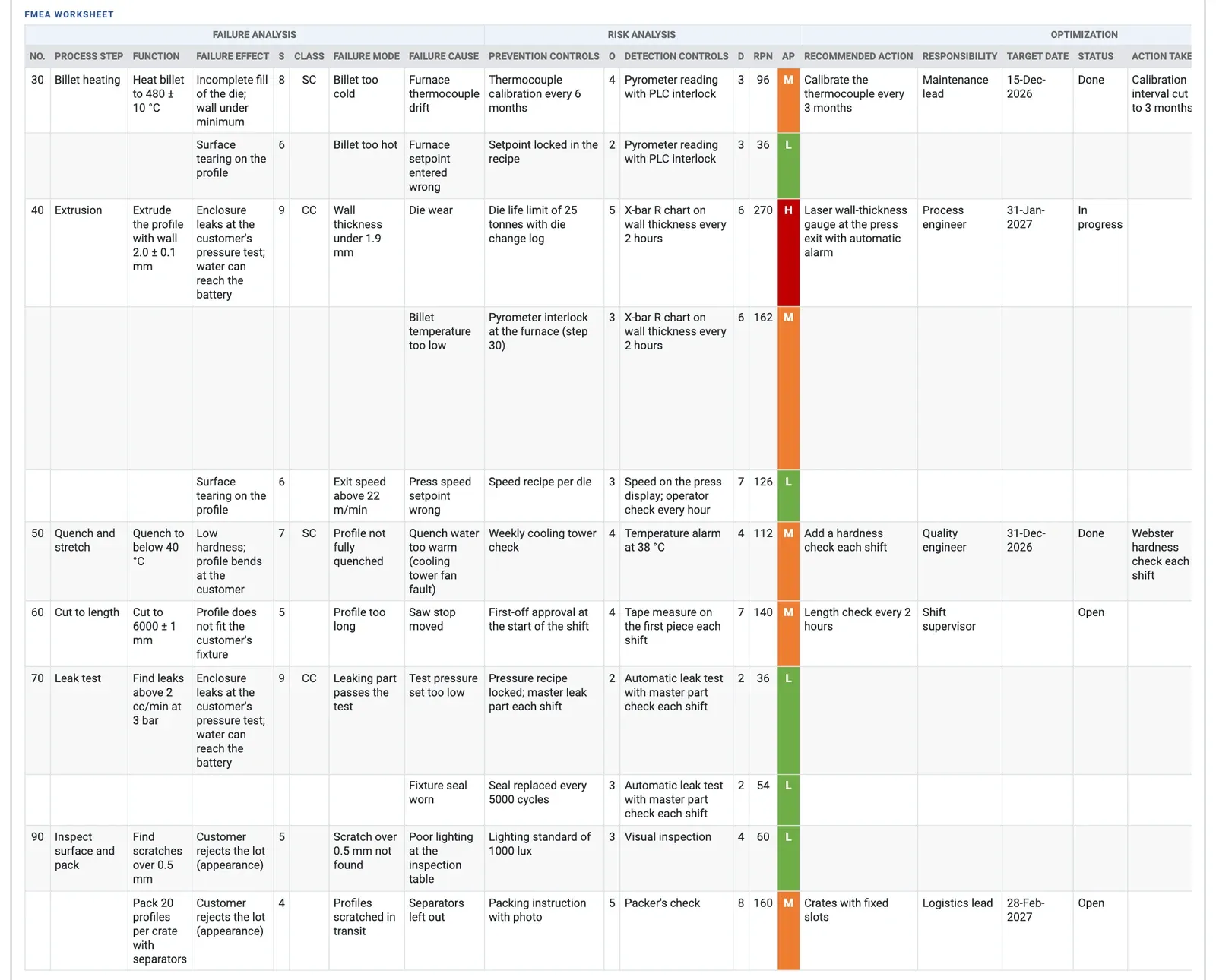
Figure 2 — PFMEA worksheet of extrusion line 2: one High row (die wear, RPN 270) and five Medium rows.
Worked Example
The team that mapped extrusion line 2 analyses the risks of its process with a PFMEA, using the step numbers of the process flow diagram. The worksheet has 11 rows: billet heating (30), extrusion (40), quench and stretch (50), cut to length (60), leak test (70) and inspect and pack (90). Each row has the function, failure mode, failure effect, severity, class, cause, prevention and detection controls with their ratings, and the actions agreed. Two actions are done and re-rated: the thermocouple calibration at step 30 and the hardness check at step 50.
One row is High: wall thickness under 1.9 mm caused by die wear, S 9, O 5, D 6, RPN 270. The laser wall-thickness gauge with an automatic alarm is in progress. Five rows are Medium and five Low. The second cause of thin wall, a cold billet, is Medium (S 9, O 3, D 6, RPN 162); the team records in Remarks that the furnace interlock at step 30 stops cold billets, so no further action is planned. The packing row (S 4, O 5, D 8) is Medium with an RPN of 160, close to the 162 of the cold-billet row, while the leak-test rows with S 9 but O 2–3 and automatic detection (D 2) are Low.
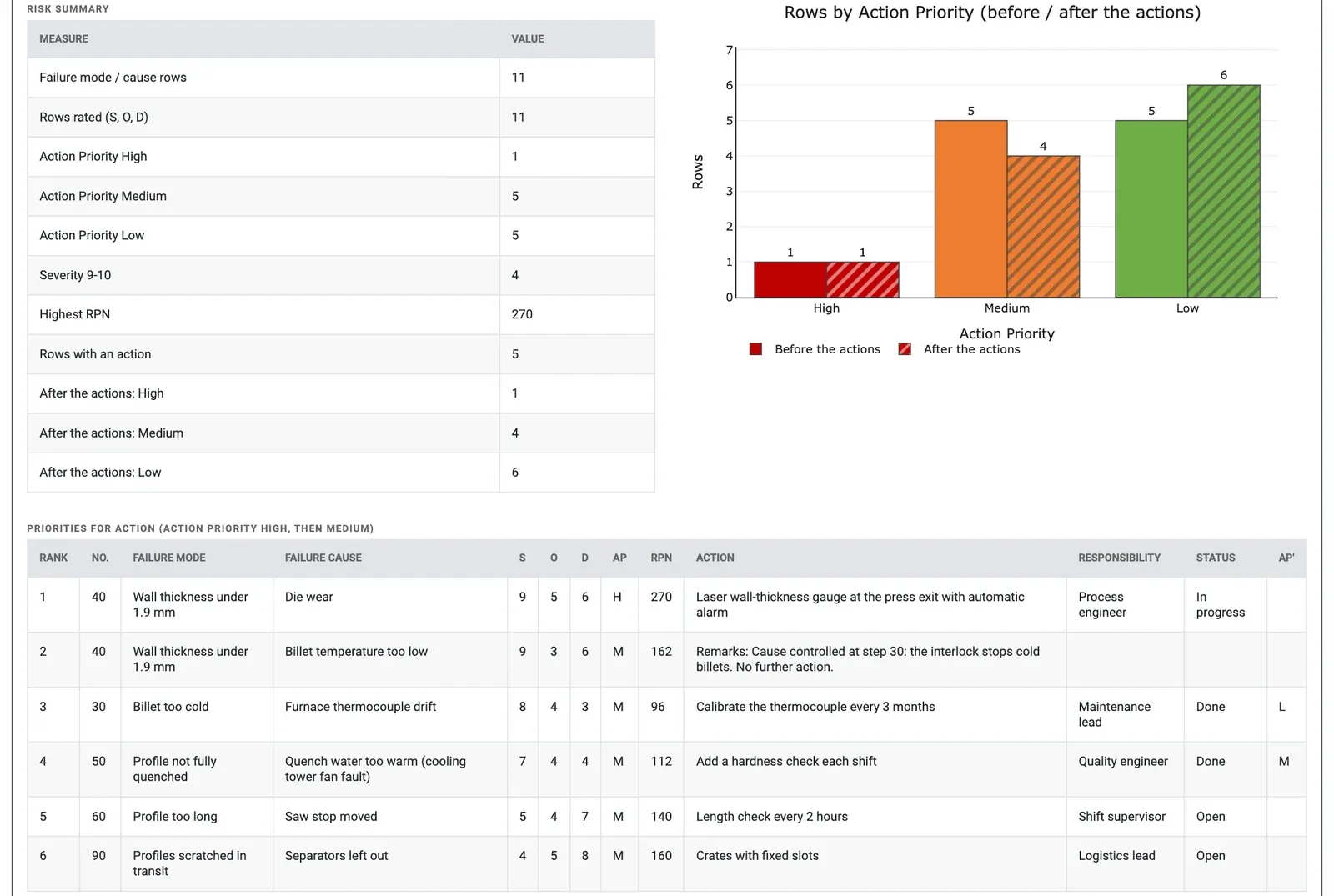
Figure 3 — Risk Summary, rows by Action Priority before and after the actions, and Priorities for Action.
After the two completed actions the count is 1 High, 4 Medium and 6 Low: billet too cold falls from Medium to Low (O 4 to 2), while profile not fully quenched stays Medium (D 4 to 3, RPN 112 to 84). The Review Notes ask for a management review of the two severity 9 rows with High or Medium priority; point out that the effect customer rejects the lot (appearance) is rated 5 on one row and 4 on another; note that the length check at step 60 has no target date; and flag the visual inspection at step 90 rated D 4, which the AIAG-VDA PFMEA table would rate 5 or higher. With D 5 that row's priority stays Low (S 5, O 3), so the correction changes the rating, not the plan.
Frequently asked questions
What is the difference between a Design FMEA and a Process FMEA?
A Process FMEA (PFMEA) analyses the steps of the process flow diagram, while a Design FMEA (DFMEA) analyses the items and functions of a design. Both list how things can fail, the effect on the customer, the causes and how well current controls prevent or detect the failure, then set priorities for action.
What is the difference between Action Priority and RPN in FMEA?
RPN is severity x occurrence x detection, each rated 1 to 10. Action Priority (High, Medium, Low) comes from the AIAG-VDA FMEA Handbook (2019) table, where severity carries the most weight, then occurrence, then detection. For example, S 9, O 5, D 6 is High, while S 4, O 5, D 8 is Medium although its RPN of 160 is close to 270.
What does a High Action Priority row require?
A High row needs an action that improves prevention or detection, or a record in Remarks of why the current controls are adequate. Rows with severity 9 to 10 and High or Medium priority should be reviewed by management. Any row with severity 1, and any row with occurrence 1, is Low.
What columns does the FMEA worksheet need in Zometric Statistical Software?
Each row is one failure mode and cause. Failure Mode, Severity, Occurrence and Detection are required; columns such as Process Step, Function, Failure Effect, Failure Cause, controls, actions, responsibility, target date and New S, New O and New D are optional. A row with a blank Failure Mode is treated as another cause of the failure mode above.